1. The Income Tax Department has launched its new e-filing portal https://www.incometax.gov.in On 7th June 2021.
2. The new e-filing portal has a simplified feature to download Form 26 AS.
3. FORM 26AS: Form 26 AS is the most important document required before filing Income Tax Return (ITR). This Form is also known as the annual consolidated statement, which contains all tax-related information of the taxpayer i.e., details of tax deducted at source, advance tax, etc.
4. Here is a Step-by-Step Guide to download or view Form 26 AS from Income Tax new portal:
(a) Log in to ‘new income tax Portal https://www.incometax.gov.in by clicking on login button at Top Right Corner of website

(b) Go to the ‘e-File’ / Income Tax Returns / menu, click ‘View Form 26 AS (Tax Credit)’ link.
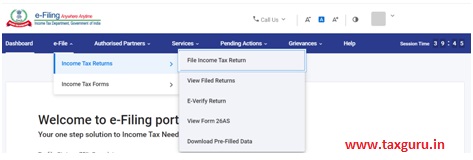
(c) Read the disclaimer, click ‘Confirm’ and you will be redirected to TDS-CPC Portal.

(d) In the TDS-CPC Portal, Agree to the acceptance of usage. Click ‘Proceed’.

(e) Click ‘View Tax Credit (Form 26AS)’
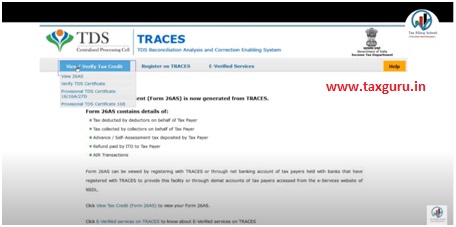
(f) The author can be approached at caanitabhadra@gmail.comSelect the ‘Assessment Year’ and ‘View type’ (HTML, Text, or PDF). Click “View/Download”
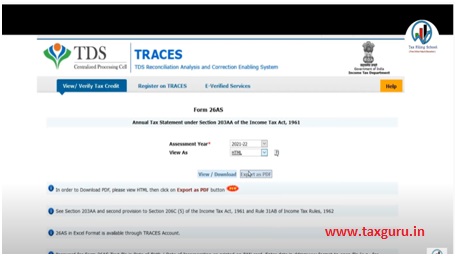
(g) To export the Tax Credit Statement as PDF, view it as HTML> click on Export as PDF and you will be able to download your form 26AS in PDF Format.
The author can be approached at caanitabhadra@gmail.com

Author Bio