Insight Instruction No. 90 issued by the Directorate of Income Tax (Systems) provides guidance to tax authorities on handling high-risk non-filer cases for Assessment Year 2022–23 under Risk Management Strategy (RMS) Cycle 6. Using data analytics from sources such as SFT, TDS/TCS statements, import-export records, and taxpayer profiles, the system identifies individuals with potential tax liabilities who have not filed returns. These cases are made available to Assessing Officers on the Insight Portal under a dedicated verification module. Officers can access detailed taxpayer profiles, including financial data, assets, relationships, and third-party information, to assess compliance risks. The instruction outlines various actions such as marking cases as untraceable or non-responsive, initiating proceedings under Section 148A/148, or closing cases where no return is required. It emphasizes that further action must comply with legal provisions and CBDT guidelines, ensuring a structured, data-driven approach to enforcement and verification of non-filers.
FAQs on CBDT’s High-Risk Non-Filer Verification for AY 2022–23
Q.1 What is the purpose of CBDT’s Insight Instruction No. 90?
Ans. Insight Instruction No. 90 provides guidance to Income Tax authorities for identifying and verifying high-risk non-filers for Assessment Year 2022–23 under Risk Management Strategy (RMS) Cycle 6. It enables data-driven verification of taxpayers who may have potential tax liabilities but have not filed their income tax returns.
Q.2 How are high-risk non-filer cases identified under RMS Cycle 6?
Ans. The cases are selected using data analytics based on information available from sources such as Statement of Financial Transactions (SFT), TDS/TCS statements, import-export data, and the taxpayer’s overall profile available in the Income Tax Department’s database.
Q.3 What information is available to Assessing Officers on the Insight Portal?
Ans. Assessing Officers can access comprehensive taxpayer information, including return profiles, financial data, addresses, contact details, assets, relationships, aggregated TDS and GST transactions, and other third-party information to assess the taxpayer’s compliance risk.
Q.4 What actions can an Assessing Officer take in a high-risk non-filer case?
Ans. Depending on the facts of the case, the Assessing Officer may mark the case as untraceable or non-responsive, record comments, reassign the case, mark it as ‘No Return Required’, initiate proceedings under Section 148A/148, or refer the matter to the Verification Unit, subject to the applicable legal provisions.
Q.5 Does Insight Instruction No. 90 automatically result in reassessment proceedings?
Ans. No. The Instruction only provides a framework for identifying and verifying high-risk non-filer cases. Any proceedings under Section 148A or Section 148 must be initiated only after considering the relevant provisions of the Income-tax Act and applicable CBDT notifications, instructions, circulars, and standard operating procedures.
Insight Instruction No. 90
Only for Departmental Users
Directorate of Income Tax (Systems),
ARA Centre, Ground Floor, E-2, Jhandewalan Extension,
New Delhi – 110055
F.No. DGIT(S)-2/ADG(S)-2/RMS Cycle – 6/583/2025-26/1109 | Date: 23.03.2026
To,
All Principal Chief Commissioner(s) of Income Tax/CCsIT
All Principal Director General(s) of Income Tax /DGsIT
All Principal Commissioner(s) of Income Tax /CsIT/CsIT(Admin & TPS)/CsIT (TDS)
All Principal Director(s) of Income Tax/DsIT
Sir/Madam,
Sub – Dissemination of certain High Risk Non-filer cases pertaining to the AY 2022-23 on Insight Portal selected under Risk Management Strategy (RMS) Cycle 6 – reg.
Kindly refer to the above.
2. A taxpayer who is having income above the prescribed limit or fulfils any other condition mentioned in section 139 of the Act is required to file return of income. Non-filers with potential tax liabilities are identified by analysing information received under, SFT Data, TDS/TCS Statement, Import Export Data etc. and overall taxpayer profile based on the information available in the database.
3. RMS Cycle – 6 for non-filer category of cases has been executed for AY 2022-23 on the basis of rules/parameters approved by the Board under RMS (Risk Management Strategy) for identifying High Risk Non-filer cases with potential tax liabilities.
4. In respect of above, High-Risk Non-filer cases for relevant assessment year(s) as approved by the Board have been made visible to the Assessing Officers (the Users) on Verification module of the Insight Portal with following case type – ‘RMS – Non filing of Return PAN cases’. The cases can be accessed on INSIGHT portal using following path –
Insight Portal 9 Verification 9 Taxpayer 9 Verification 9 Case type 9 ‘RMS – Non filing of Return PAN cases’
For detailed description of case view and underlying information, the Users may refer to the Annexure “A” enclosed.
5. Underlying information including various third-party data/information related to PAN of assigned cases may also be accessed on Profile Views of Insight Portal. Profile Views shows various information related to taxpayer including:
a. Comparative ITR information under Return Profile (TRP)
b. Comparative key values, financial ratios etc. under Financial Profile (TFP)
c. Details of various address, email, mobile numbers under Master Profile (TMP)
d. List of accounts, immovable assets etc under Asset Details (TAD)
e. List of key persons, shareholders etc under Relationship (TRL)
f. Third Party Information, Aggregated TDS Payments, Aggregated GST Transactions, and other information under Taxpayer Annual Summary (TAS)
6. Following activities are available on Case Detail screen which can be accessed by clicking Initiate Activity drop down button:
a. Mark case as untraceable: This generic functionality allows User to mark such cases where the communications are not getting delivered to the taxpayer as untraceable for feedback purpose.
b. Mark case as Non-Responsive: The User can mark such cases where the communications are getting delivered to the taxpayer but the taxpayer is not responding to the queries sent on Compliance Portal through this functionality.
c. Enter Comments: The User can record remarks at the case level.
d. Case Reassignment: The User can select multiple cases and re-assign/ transfer them.
e. No Return Required: In Non-filing of Return (NMS)/RMS cases, the User can mark a case as ‘No Return Required’, if the User comes to this conclusion post assessment of response submitted by the taxpayer.
f. Initiate Proceedings u/s 148A/148: The User may use this particular functionality for initiating proceedings related to issuance of notice u/s 148A for cases under RMS.
g. Initiate Reference: The user may utilize this functionality to initiate a reference to the Verification unit after obtaining the necessary approval.
7. Further, necessary action u/s 148A of the Income-tax Act, 1961 in respect of the above disseminated cases for AY 2022-23 under RMS Cycle-6 shall be taken after taking into account all relevant applicable provisions of the Act.
8. The Assessing Officers may also further refer to relevant Notifications/Instructions/Circulars/S.O.Ps for cases disseminated under Risk Management System issued by the CBDT from time to time.
9. In case of any technical difficulty, the Users may immediately contact OR write to Insight helpdesk. (Helpdesk number – 1800 103 4216, Email id: [email protected]).
Yours faithfully,
(Nikhil Varma)
Addl. Director General (Systems)-2
Copy to:
1. PPS to the Chairman, Member (S&FS), Member (TPS), Member(L), Member (A&J), Member (Adm.) & Member (lT), CBDT, DGIT(Systems), Delhi and DGIT(Systems), Bengaluru for information.
2. Nodal officer of ITBA, Insight i-Library and irsofficersonline website.
Addl. Director General (Systems)-2
Insight Instruction No. 90- Annex-A
Only for Departmental Users
Annexure – ‘A’
Step by Step Screen shots
1. The list of RMS cases assigned to the User can be accessed as under
a) Login to Insight Portal (https://insight.gov.in).
b) Select Verification Tab available under Taxpayer Verification.
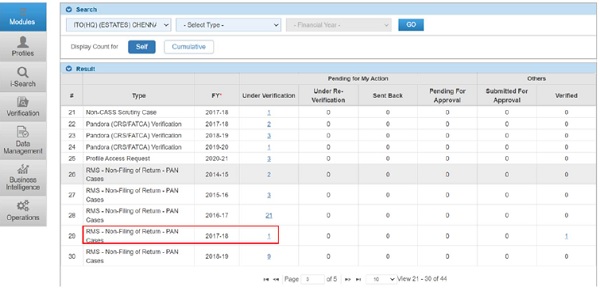
c) List of cases assigned to the User will be displayed to the User under Verification Summary
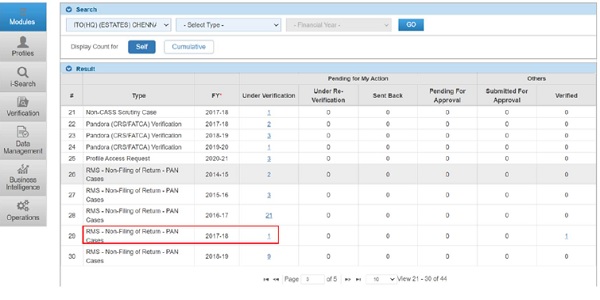
2. User needs to click on count displayed under case status “Under Verification” will navigate User to Case List View.
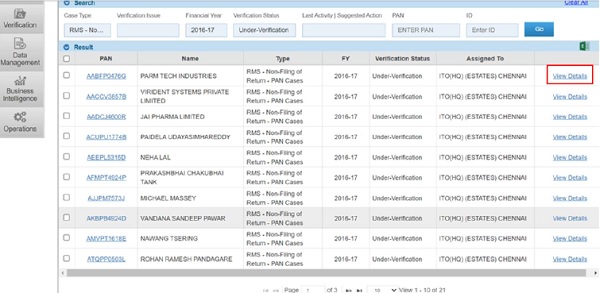
3. User needs to click on View Detail Hyperlink to navigate to Case Detail View
4. User needs to click on select activity to select Case Level activities
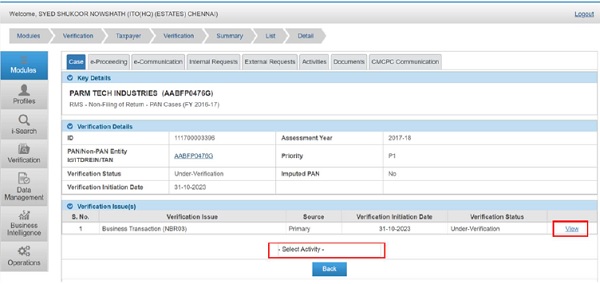
5. Following Activities will be applicable to the Case
a. No Action Required
b. Mark case as untraceable
c. Mark case as non-responsive
d. Enter Comments
e. Initiate proceeding u/s 148A/148
f. Reassign Case
g. Initiate Reference
6. User will be able to click on “View Detail” hyperlink DISPLAYED AGAINST EACH Verification Issue to navigate to “Verification Issue Detail” screen.
7. TSN will be hyperlink which will navigate User to pop up view of Information details
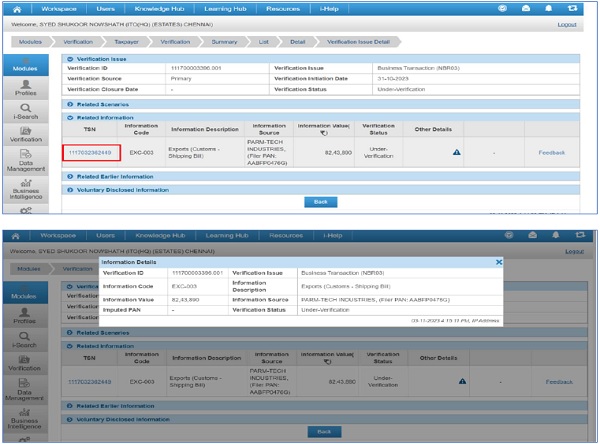
8. Case Level Activity- Initiate Reference
If User want to initiate Reference from the case for Verification Unit, this activity can be performed. After providing the necessary details the activity can be submitted for approval to appropriate authority. After Approval the reference will be visible for necessary action to Verification Unit.
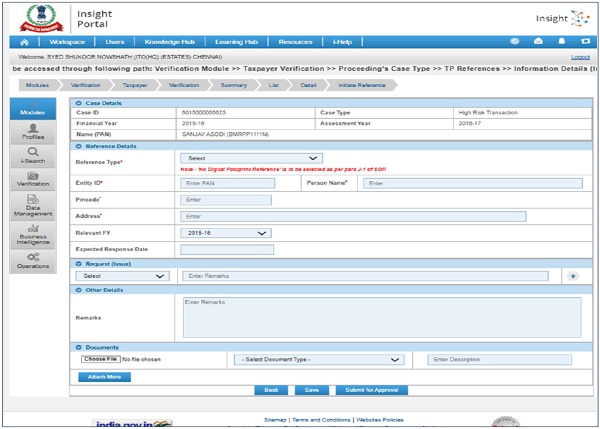
Case Level Activity- Initiate Proceedings u/s 148/148A
The steps to Initiate Proceedings u/s 148 at Insight Portal are as following:
Step 1 : Access ‘High Risk CRIU/VRU Information’ cases on Insight Portal (Refer steps mentioned above).
Step 2 : Select Case Activity ‘Initiate Proceedings u/s 148’.
Step 3 : Enter required details on next screen (i.e. Compliance Days, Address, Selection Reason).
Step 4 : Click on Submit. Worklist pendency will be created on ITBA.
Note: Initiated Activity can be viewed under ‘Activities’ tab of case module.