Common portal of GST under the GST law, GSTN keeps on issuing advisories on new functions / updates on the portal for upgradation of functionalities and new options or functions enabled for implementation by taxpayers.
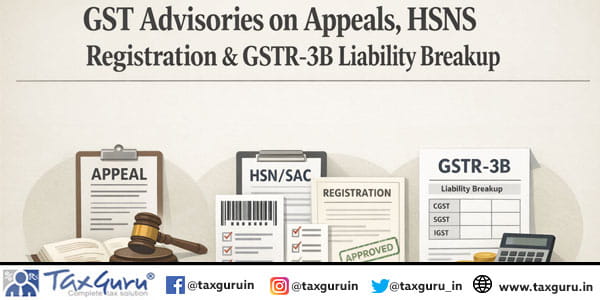
During the month of March, 2026, the following Advisories have been issued so far in relation to the various compliances by GSTN and instructions issued by GSTAT:
- GSTAT Instructions on Filing of Appeals
- SOP for Registration under Health Security se National Security Cess (HSNS)
- Advisory on the Payment of pre-deposit while filing of appeal before First Appellate Authority
- Confirmation of “Tax Liability Breakup, As Applicable” in GSTR-3B
The gist of these Advisories / Updates is summarized hereunder for easy understanding:
SOP for Registration under Health Security se National Security Cess (HSNS)
CBIC, Office of Additional Director General of Systems, has issued a set of Standard Operating Procedure (SOP) for tax officers on processing of applications filed for registration, cancellation, revocation and payment under the Health Security se Security Cess Act, 2025 (HSNS) read with HSNS Rules, 2026 for levy of cess on the machines installed or other process undertaken for the manufacture or production of specified goods as per Schedule-I of HSNS Cess Act, 2025.
- The SOP Phase-I involves the following:
a. HSNS Cess taxpayer’s Login
b. Enrollment
c. Filing of Registration Form – Form HSNS REG-01
d. Payment of HSNS Cess – Form HSNS PMT-01
- SOP for tax officers is on processing applications filed in respect of registration, cancellation, revocation, payment and helpdesk.
- The proposed automation process will not have any interactive workflow between the taxpayer and tax officers for the time being(except for approving/rejecting REG-01).
- SOP contains details about:
- Tax officers dash board
- Processing registration application in Form HSNS REG-01.
√ Every ‘Taxable Person’ liable to be registered under ‘Section 8 of HSNS ACT’ shall apply for registration by submitting the FORM HSNS REG-01 on the Portal along with the documents specified in the said form.
-
- Request for cancellation by taxpayer / cancellation by tax officer.
- Revocation of cancellation
- Payment of HSNS Cess
- Help desk currently used for ACES-GST portal will cater to the needs of taxpayers and tax officers in respect of HSNS Cess.
- Mail Id: [email protected]
- Toll Free Number: 18004250232
(Source: File No. DGSYS/APP/CZU/RGMO/1/2025-ACES/GST O/o-ADG-DGS-ZU-CHENNAI-Part (1) dated 29.01.2026 issued by CBIC, Office of Additional Director General of Systems]
GSTAT Instructions on Filing of Appeals
Goods & Services Tax Appellate Tribunal (GSTAT) has issued the following instructions to facilitate smooth filing of appeals:
- APL-05 must contain soft copies of Show Cause Notice (SCN), Order-in-Original (OIO), Order-in-Appeal (OIA), Statement of Facts and grounds of appeal. Section 112 deals with filing of appeals before Appellate Tribunal.
- Pre-deposit and Court fees are compulsory. However, if there are any orders of the Higher Courts for exemption of Court Fee / Pre Deposit then flag (defect) should not be raised.
- No Court fees / pre-deposit is required in appeal filed by the Revenue (Department).
- In case the Appellant prefers appeal under Section 112(1) by attaching a scanned copy certified OIO, OIA and if the Scrutiny officer of GSTAT is satisfied from the endorsement made therein by the issuing Authorities, that it is a certified copy of OIO or OIA, a flag(defect) should not be raised.
- The Appellant taxpayer is also required to upload a copy of the Authorization issued in favour of the tax professional or Vakalatnama executed in the name of an Advocate.
- As far as the application filled by the Revenue under Section 112(3) are concerned, the following document are necessary:
- Show Cause Notice.
- Order in Original
- Order in Appeal.
- Opinion of the Commissioner directing his officer to make the application.
- Statement of facts.
- Grounds of appeal.
- One Verification and Digital Signature of appellant is required.
[Source: GSTAT Instructions Dated 10/03/2026 (File No. GSTAT/Pr. Bench/Portal /125/2025-26/3368) issued by Registrar, GSTAT]
Advisory on Payment of pre-deposit while filing of appeal before First Appellate Authority
- Any payment made through Form GST DRC-03 is not automatically linked to the Demand ID in the Electronic Liability Register, as the system only recognizes payments made through the Payment towards Demand option.
- Therefore, when a taxpayers makes voluntary payments during the investigation stage through Form GST DRC-03 and subsequently, a demand order such as Form GST DRC-07 is issued, the GST portal may still ask for the mandatory pre-deposit while filing an appeal.
- To avoid this issue, taxpayers should file Form GST DRC-03A to link the DRC-03 payment with the relevant Demand ID before filing the appeal. This ensures that the earlier payment is recognized by the system and prevents duplicate pre-deposit payment.
(Source: GSTN Advisory dated 14.03.2026)
Confirmation of “Tax Liability Breakup, As Applicable” in GSTR-3B
- According to Section 50 of the Central Goods and Services Tax (CGST) Act, 2017, interest is payable where the tax liability pertaining to a previous tax period is discharged in a subsequent tax period. Accordingly, the tab “Tax Liability Breakup, As Applicable” in Form GSTR-3B is meant to capture the tax liability relating to supplies of previous tax periods which are being reported and discharged in the current tax period.
- From the February 2026 tax period onwards, the GST Portal auto-populates the “Tax Liability Breakup, As Applicable” in GSTR-3B on the basis of the document dates of supplies reported in GSTR-1 / GSTR-1A / IFF, where such supplies pertain to any previous tax period but the corresponding tax liability is being discharged in the current period’s GSTR-3B.
- Accordingly, from the February 2026 tax period, after offsetting the liability in GSTR-3B, taxpayers are required to click on the “Tax Liability Breakup, As Applicable” tab available on the payment page and confirm the breakup of tax liability by clicking the “SAVE” button or edit the same, if required.
- Once the breakup of tax liability is confirmed and saved, the taxpayer will be able to proceed with filing Form GSTR-3B using EVC or DSC.
- Meanwhile, taxpayers are requested to kindly open the “Tax Liability Breakup, As Applicable” tab on the payment page and click “SAVE” within the tab for filing during the current reform cycle. Thereafter, filing of Form GSTR-3B can be completed normally.
- Taxpayers are requested to kindly follow the above interim procedure till the issue is resolved on the portal.
(Source: GSTN Advisory dated 16.03.2026)
Frequently Asked Questions (FAQs)
Q.1 What were the key GST advisories issued during March 2026?
Ans. During March 2026, GSTN and GSTAT issued advisories covering GSTAT appeal filing instructions, the Standard Operating Procedure (SOP) for HSNS registration, guidance on linking pre-deposit payments while filing appeals, and the confirmation of the “Tax Liability Breakup, As Applicable” in GSTR-3B.
Q.2 Why should taxpayers file Form GST DRC-03A before filing an appeal?
Ans. If a taxpayer has made a voluntary payment through Form GST DRC-03 during the investigation stage, filing Form GST DRC-03A links that payment to the relevant Demand ID. This enables the GST portal to recognize the earlier payment and helps avoid payment of a duplicate mandatory pre-deposit while filing an appeal before the First Appellate Authority.
Q.3 What is the purpose of the ‘Tax Liability Breakup, As Applicable’ tab in GSTR-3B?
Ans. The tab captures tax liabilities relating to supplies of previous tax periods that are being discharged in the current tax period. From the February 2026 tax period onwards, taxpayers are required to review the auto-populated breakup, confirm or edit it if necessary, and click ‘SAVE’ before filing GSTR-3B using DSC or EVC.
Q.4 What is the SOP for registration under the Health Security se National Security Cess (HSNS)?
Ans. The SOP outlines the procedure for registration, payment, cancellation, and revocation under the Health Security se National Security Cess (HSNS) Act, 2025. Taxable persons liable for registration must file Form HSNS REG-01 through the GST portal, while HSNS cess payments are to be made using Form HSNS PMT-01.
Q.5 What documents are required while filing an appeal before the GST Appellate Tribunal (GSTAT)?
Ans. An appeal generally requires uploading soft copies of the Show Cause Notice (SCN), Order-in-Original (OIO), Order-in-Appeal (OIA), Statement of Facts, Grounds of Appeal, and, where applicable, the authorization or vakalatnama. Taxpayers must also comply with the prescribed pre-deposit and court fee requirements unless exempted by a competent court.