The Department of Posts, through SB Order No. 06/2026 dated 22 June 2026, has introduced Aadhaar-based e-KYC operations and inter-operability of Post Office Savings Bank (POSB) accounts in Branch Post Offices (BOs) under Phase I. The new framework enables conversion of existing Customer Information Files (CIFs) into Aadhaar-based e-KYC CIFs through biometric authentication, allows paperless deposits up to ₹1.5 lakh in POSA, RD and Sukanya Samriddhi Accounts, and withdrawals up to ₹1.2 lakh in POSA accounts without transaction slips for eligible single-holder accounts. Branch Post Offices can now conduct Aadhaar-authenticated transactions in POSB accounts maintained at any post office, significantly enhancing accessibility. Mobile number linkage has been made mandatory for all e-KYC transactions, and from 1 September 2026, DREAM app transactions will not be permitted in accounts without registered mobile numbers. The order also mandates masked Aadhaar usage, staff training, detailed SOPs, and enhanced reporting for secure implementation.
No. 25-01/2018-FS-CBS
Government of India
Ministry of Communications
Department of Posts
(F.S. Division)
Dak Bhawan, New Delhi — 110001
SB Order No. 06/2026 | Dated:22.06.2026
To
All Head of Circles / Regions
Subject: Introduction of e-KYC operations and Inter-operability of POSB accounts in Branch Post Offices.
***
Madam/Sir,
e-KYC enabled POSB account opening and transactions through Aadhaar Authentication basis was introduced in Departmental Post Offices across the country w.e.f. 06.01.2025. A detailed SOP was circulated vide SB Order No. 01/2025 dated 01.01.2025.
2. In continuation, it has been now decided to introduce the e-KYC based transactions in Branch Post Offices (BO). Accordingly, in the Phase-I, the following functionalities are being introduced in Digital Rural Enterprise Application for Mobiles (DREAM) application used in BOs w.e.f 22.06.2026 for-
I. Conversion of existing Customer Information File (CIF) to Aadhaar based e-KYC CIF through biometric authentication.
II. Acceptance of deposits up to 150,000/- in PO Savings Accounts (POSA), Recurring Deposit (RD) Accounts and Sukanya Samriddhi Accounts (SSA) on bio-metric authentication of the depositors, without pay-in-slip.
III. Allowing of withdrawals up to 120,000/- in POSA accounts on bio-metric authentication of the depositors, without withdrawal slip.
IV. The facility will be available only for single-type accounts and not for minor/Joint accounts.
V. For high value deposits and withdrawals, BPM should follow the existing paper-based process of obtaining the withdrawal application form and taking approval of the respective Accounts Office.
3. At present, BOs are allowed to perform transactions only in the accounts standing at the BOs concerned. On introduction of Aadhaar authenticated e-KYC transactions in BOs, it has been decided to introduce BO inter-operability i.e., the BOs shall henceforth, be enabled to perform transactions in an account standing in any post office, through Aadhaar authentication. Non-Aadhaar authenticated transactions shall continue to be performed only in the accounts standing in the same BO.
4. It is reiterated that vide SB Order No. 17/2017 dated 03.10.2017, linking of a mobile number was made mandatory for new POSB account opening. Subsequently, vide SB Order No. 01/2022 dated 13.01.2022, it was decided that transactions shall not be permitted in accounts not linked with a mobile number.
5. Thus, mobile number shall be mandatory for customers initiating e-KYC and Aadhar authenticated deposits and withdrawal transactions. With effect from 01.09.2026, no transactions through DREAM app shall be allowed in accounts which are not linked with mobile number.
6. Aadhaar number and Mobile number linked CIFs can be converted into e-KYC CIF on the basis of digital consent obtained from the customers. While converting to e-KYC CIF, the details namely Name of the Customer, C/o Name (Father/Husband’s Name), Date of Birth, Gender and Address with PIN Code will be fetched from Central Identities Data Repository (CIDR) of Unique Identification Authority of India (UIDAI).
7. There is no provision to edit any of the above fetched data. If any data is not fetched or fetched partially in case of any of the customer, such customer’s CIF will not be converted to e-KYC CIF and the customer should be requested to update the Aadhaar with correct information for performing Aadhaar authenticated transactions in the POSB Accounts. Such customers shall continue to operate the accounts performing paper-based transactions, till updations.
8. If any e-KYC enabled depositor approaches the BOs, for any change in the customer information like updation of address/PAN, submits DBT Mandate request or e-Banking/M-Banking Activation etc., the depositor may be requested to visit the Account Office. In case of non e-KYC customers, existing process for change in KYC details etc. shall be continued.
9. The BO Daily Transaction Report has been updated to identify the Aadhaar authenticated and voucher-based transactions.
10. Separate reports of all the Aadhaar Authenticated Transactions “EKYC Long Book Consolidation Report (SDP & AO)” and “EKYC Long Book Detailed Report (SDP & AO)” shall be available in the Reports Menu (HFINRPT), for the Account Offices, in Finacle Production and MIS Environment.
11. A detailed Standard Operating Procedure (SOP) is enclosed herewith.
12. It is once again reiterated that:
a. in any record / document / application like AOF etc., if the Aadhaar Number is required to be written on such document, it should be ensured that only masked Aadhaar Number is written, in the form of XXXX-XXXX-________________ . If any
document contains the unmasked Aadhaar, Postmaster should ensure that first eight digits of the Aadhaar number are masked using black ink pen or sketch or by any available means.
b. All the post offices including branch post offices and CBS-CPCs should ensure that the Aadhaar Number is masked in all the existing documents like AOF, KYC Form etc. containing the Aadhaar Number including the copy of the Aadhaar obtained.
13. A training course on “Introduction to e-KYC functionalities in the DREAM application for GDS” has been created and is available on the Dak Karmayogi and iGOT portals. All Circles are requested to instruct the concerned staff to undergo the mandatory training to ensure better understanding and smooth implementation of the functionalities.
14. It is requested to circulate these instructions to all post offices for information and guidance.
15. This issues with the approval of Competent Authority.
Yours faithfully
(Devender umar Sharma)
Assistant Director (SB-II)
Copy to: –
1. PPS to Secretary (Posts)
2. PPS to Director General Postal Services
3. PPS/ PS to Member (Financial Services)/Member (0)/Member (P)/ Member (HRD)/ Member (Tech)/ Member (Service Quality and Marketing), Member (Infrastructure), JS & FA
4. Director General, APS, New Delhi
5. Chief General Manager, BD Directorate / Parcel Directorate / PLI Directorate.
6. CGM, CEPT for kind information and necessary action.
7. Deputy Director General (Vig) & CVO) / Sr. Deputy Director General (PAF)
8. Director, RAKNPA / Directors of all PTCs
9. Director, CPRC Chennai.
10. Director General P & T (Audit), Civil Lines, New Delhi
11. Secretary, Postal Services Board / All Deputy Directors General
12. All General Managers (Finance) / Directors Postal Accounts / DDAP
13. The Joint Director & HOD, National Savings Institute, ICCW Building, 4 Deendayal Upadhyay Marg, New Delhi-110002
14. The Under Secretary, MOF (DEA), NS-II Section, North Block, New Delhi.
15. All recognized Federations / Unions / Associations
16. Guard File/e-File.
(Devender Kumar Sharma)
Assistant Director (SB-II)
Standard Operating Procedure
CBS e-KYC operations in Branch Posts Offices
(I). Introduction
Department of Posts has decided to enable paperless transactions by introducing Aadhaar based authentication process (e-KYC) in Branch Post Offices (BOs) in a phased manner.
Initially the following functionalities are being introduced.
i. Converting the existing non-e-KYC customers to e-KYC customers
ii. Acceptance of deposits up to Rs 50,000/-in PO Savings Accounts (POSA), Recurring Deposit (RD) Accounts and Sukanya Samriddhi Accounts (SSA) and allowing withdrawals up to Rs 20,000/- in an account per day for POSA accounts on bio-metric authentication
(II).Procedure in BOs and Account Offices
The detailed Operating procedure is as follows.
(1). Conversion of existing KYC customers to e-KYC customers:
a. If the existing customers desire to operate their accounts on Aadhaar Authentication basis, CIF may be converted to e-KYC CIF.
b. Conversion to e-KYC CIF is allowed for only if the mobile number and Aadhaar number are linked in the CIF. If there is no mobile number or Aadhaar number linked in the CIF or if the Aadhaar number is linked with more than one CIF, BPM should obtain the request of the customer for updations of the mobile number or Aadhaar number or both as the case may be, and send the request to Account Office for updations of mobile number or Aadhaar number or both in the CIF.
c. Customer will be requested to provide his/her CIF ID and Aadhaar number.
d. If the BPM is satisfied, he/she shall follow the below mentioned process in DREAM App.
-
-
- BPM should
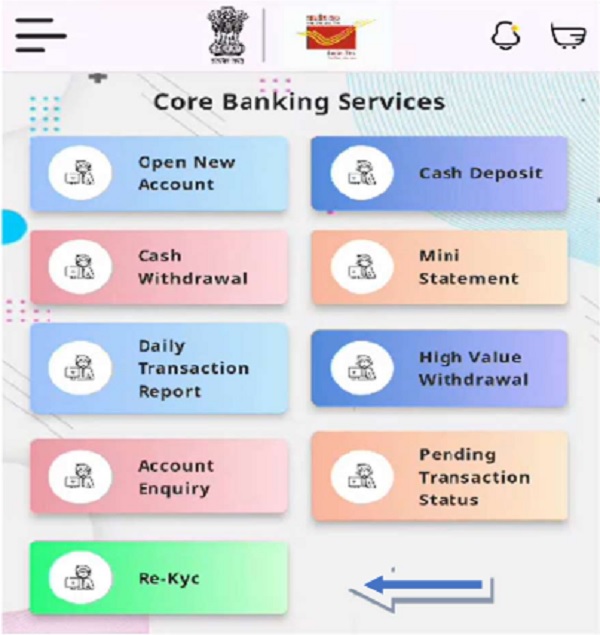
- Click ‘Core Banking Services’ from the menu in home page.
- Click on ‘Re-KYC’
- Enter the Customer ID (CIF ID)
- Enter the Aadhaar Number
- Click on ‘Submit’
- Click on the Consent Check Box – The BPM should explain the customer about the e-KYC consent in local language.
- Click on Biometric Authentication
- Obtain the Bio-metric of the customer
-
-
-
- BPM can view the photo and demographic details of the customer as per the information available in Aadhaar.
-
e. Customer shall be requested for capturing biometric and on successful authentication, the existing details viz. Name, Date of Birth (DOB), Gender, Address with City, Pin code, State and Country of the customer, and the details received from UIDAI will be displayed on the screen.
f. If the name, DOB and Gender matches with those in the Aadhaar database CIF will be converted into e-KYC CIF. If the percentage of match is not as prescribed, the customer shall be requested to update the Aadhaar with correct name, gender and DOB.
g. Existing CIF will successfully be changed to e-KYC CIF and the CIF ID will remain the same.
(2).Deposits / Withdrawals on Aadhaar Authentication Basis
(a). Acceptance of Subsequent Cash Deposits in POSA, RD and SSA Accounts
a. If any depositor whose CIF is already an e-KYC CIF desires to make deposit, the depositor may deposit the cash subject to the limit prescribed for accepting the cash deposit in an account in a day i.e. ₹ 50,000/- in POSA, RD and SSA Accounts via Aadhaar authentication basis without submitting the pay-in-slip.
b. The BPM after accepting the cash from the depositor, should login to the DREAM App and select Core Banking Services in Home Page Menu.
c. BPM should
-
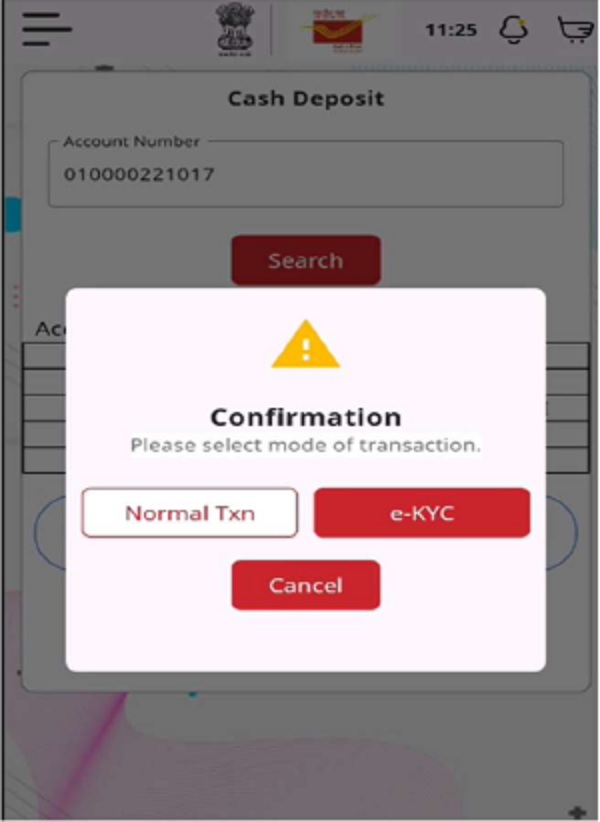
- Click on Cash Deposit
- Enter the Account Number
- Click on ‘Search’ button
- Account details (Account Number, CIF ID, Name, Scheme and Balance) will be fetched and displayed.
- Enter the Amount of Transaction as orally confirmed by the depositor
- Click on ‘Initiate Transaction’
- If the CIF of the account number entered is an e-KYC CIF,
- Click on ‘e-KYC’ option
-
- Enter the OTP sent to BPM’s Mobile Number
- Click on ‘Verify OTP’
- Click on the consent check box
- Click on ‘Biometric Authentication’
- Request the depositor for biometric authentication
- If the CIF of the account number entered is a non e-KYC CIF
- Should ensure that pay-in-slip is obtained from the depositor.
- Click on ‘Normal Txn’
- Click on ‘Yes’ to confirm the transaction with the amount entered
- Click on ‘Print’ to print the receipt / acknowledgment.
- Write the Transaction ID on the top – right hand side pay-in-slip in case of paper-based transaction. (Pay-in-slip will not be applicable for Aadhaar authenticated transaction)
d. The BPM should make the transaction entry in the passbook and affix the date stamp in the passbook.
e. System generated instant SMS will be sent to the customer’s registered mobile number on successful completion of transaction.
> Similar procedures may be followed for RD and SSA accounts
(b). Withdrawals from POSA
a. If any depositor whose CIF is already an e-KYC CIF desires withdrawal from POSA, the depositor may withdraw the cash upto Rs. 20,000 without submitting the withdrawal form, on Aadhaar authentication basis
b. The BPM should login to the DREAM App and select Core Banking Services in Home Page Menu.
c. If the withdrawal amount is up to ₹20,000/-, BPM should
-
-
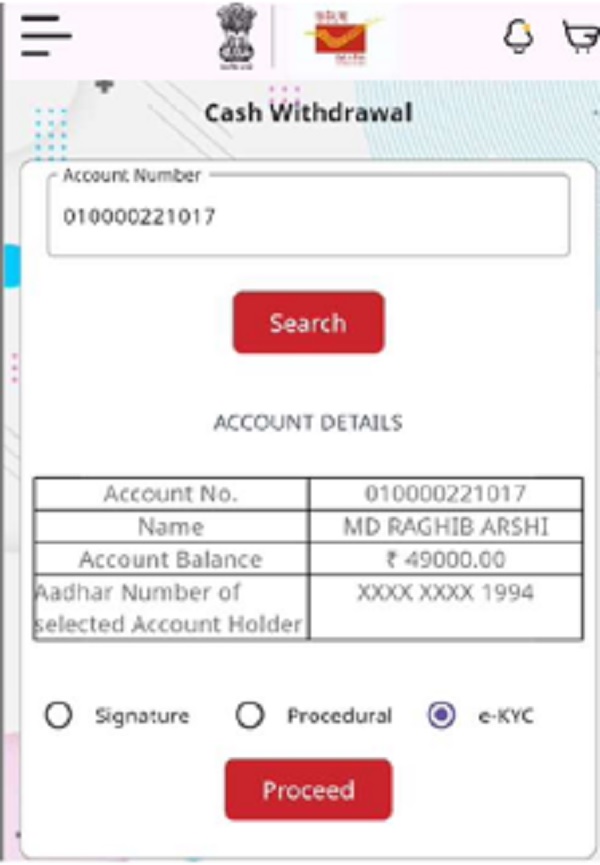
- Click on Cash Withdrawal
- Enter the Savings Account Number
- Click on ‘Search’ button
- Account details (Account Number, Name, Balance and Aadhaar Number in masked format) will be fetched and displayed.
- If the CIF of the entered account number is an e-KYC CIF
- Select the option ‘e-KYC’
-
-
- Click on ‘Proceed’
- Enter the OTP sent to BPM’s Mobile Number
- Verify OTP
- Click on the consent check box
- Click on ‘Biometric Authentication’
- Request the depositor for biometric authentication
- If the CIF of the entered account number is a non-e-KYC CIF, existing paper – based process shall be followed.
- Enter the Amount of withdrawal as confirmed by the depositor
- Click on ‘Initiate Transaction’
- Click on ‘Yes’ if the amount entered is correct on Confirmation screen.
- Click on ‘Print’ to print the receipt / acknowledgment.
- Write the Transaction ID on the top – right hand side of withdrawal form if it is paper-based transaction (Withdrawal form is not required for Aadhaar authenticated transaction).
e. If the withdrawal amount is above Rs 20,000/-, BPM should follow the existing paper-based process of obtaining the withdrawal application form from the depositor and proceed in accordance with the existing procedure.
f. System generated instant SMS will be sent to the customer’s registered mobile number on successful completion of transaction.
Note 1: Pay-in-slip shall not be collected for Aadhaar Authenticated Transaction. Note 2: Submission of Passbook by the depositor is mandatory for all paper-based transactions and high value withdrawals.
(C).Other Instructions
(a).For Branch Post Offices
a. If any e-KYC enabled depositor approaches the BOs, for change in the customer information like updations of address etc. or replaces Form-60/61 with PAN Number or submits the DBT Mandate request or e-Banking / M-Banking Activation etc., the depositor may be requested to visit the Account Office.
b. In case of non e-KYC customers, existing process of submission of forms for change in KYC details etc. shall be continued.
c. The BO should follow the existing process for opening of new accounts and closure of accounts.
d. To open a new account for a e-KYC enabled CIF, the Account Opening Form (SB-e-KYC-AOF) prescribed in SB Order No. 01/2025 may be obtained. If any of the depositor’s CIF in a new joint account is non e-KYC CIF, regular account opening form (SB-AOF) may be obtained.
e. BOs can carry out the Aadhaar authenticated transaction in any POSA, RD, and SSA single type accounts irrespective of the account standing in the same BO or any other post office. But the Aadhaar authenticated transactions are not allowed in Joint and minor type accounts.
f. In all the official records / forms / documents, the Aadhaar number should be in masked form only. If Aadhaar number is written without masking, the post office should mask the first eight digits of the Aadhaar number by any available means.
g. In case of network error, BPM should check the status of transaction to avoid duplication.
h. BPM should check status of transactions, which showed network related error messages before initiating the transaction again. This will avoid performing a duplicate transaction.
i. Before generation of DTR (Daily Transaction Report) for the day – status check should be completed for all the pending transactions in Transaction Update menu.
j. Process to generate DTR in DREAM App:
BPM should
-
- login to the DREAM App and select Core Banking Services in Home Page Menu
- Click on ‘Daily Transaction Report’
- Select the Date Range
- Click on ‘Fetch’
- All the transactions will be displayed
- Click on ‘Print’ to print the DTR
k. BPM on completion of Day’s work in CBS will generate the Daily Transaction Report from the device. BPM should verify and tally the vouchers with the voucher-based transactions in the DTR. Along with the vouchers, BPM will send the Daily Transaction Report to Account Office duly entered in BO Daily Account and BO Journal.
(c). For Account Office
1. Account office should strictly ensure that accounting is done for the BO transactions under their jurisdiction.
2. Transaction report at Account Office can be viewed by invoking HFINRPT menu in Long Book Detailed Report and compare with the DTR and vouchers received from BOs. Report names are given in para III (b).
III. Accounting & Auditing Procedure
1. There is no change in the accounting procedure and the existing accounting procedure will continue as the e-KYC operation has no new financial transaction involved, e-KYC is purely a technology supported process.
2. For the purpose of auditing / monitoring by SBCO and Inspecting / Visiting Authorities, the following reports will be available for Aadhaar based transactions and the total amount of Aadhaar based transactions will get included in Long Book Consolidation Report.
-
- EKYC Long Book Consolidation Report – SDP and AO (Today)
- EKYC Long Book Detailed Report – SDP and AO (Today)
- EKYC Long Book Consolidation Report – SDP and AO (Previous Day)
- EKYC Long Book Detailed Report – SDP and AO (Previous Day)