1. The Annual Information Statement (AIS), which can aptly be referred to as “आइना इसे समझिए” in Hindi, is a detailed statement that reflects a taxpayer’s financial transactions—such as income, investments, and capital gains—as reported by various third-party sources.
2. It is essential to check the AIS before filing an Income Tax Return (ITR) to ensure that all income details are accurately reported. This helps to avoid mismatches with the Income Tax Department’s records, reducing the risk of notices or demands for additional tax
3. The AIS summary displays the sale value of securities but does not directly reflect the capital gain or loss amount. Hence, taxpayers must extract and compute the capital gains separately, considering the purchase cost and other details, to report the correct taxable amount in the ITR.
4. This article aims to provide a step-by-step guide to extracting Capital Gain details from the Annual Information Statement (AIS).
4.1 Login to https://www.incometax.gov.in. & click on AIS

4.2 This will open the AIS portal. Select FY 2024-25 & click on the download key of AIS

4.3 Go to Activity History & download AIS.

4.4 Download the AIS Utility from the Resources section

4.5 Click on the downloaded AIS utility and import the JSON file (downloaded from Activity History). The password will be a combination of the PAN and date of birth. For example, if the PAN is AAAAA1234A and the date of birth is 21 January 1991, then the password will be aaaaa1234a21011991.
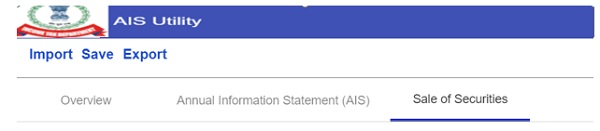
4.6 Click on sale of securities Scroll down to the bottom of the page. Click on “Calculate Capital Gain”.

You can now view the Capital Gain Summary, where the Short-Term Capital Gain (STCG) Summary will be available for review.
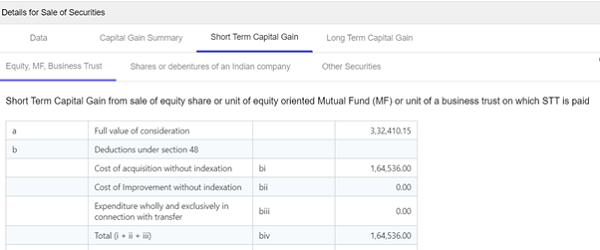
4.7 If the investment falls under Equity Funds covered by Section 112A, download the scrip-wise report for detailed information

4.8 After accepting the disclaimer, the scrip-wise details will be available in Excel format. This Excel file provides a detailed breakup of transactions, essential for accurate capital gain computation and ITR reporting.

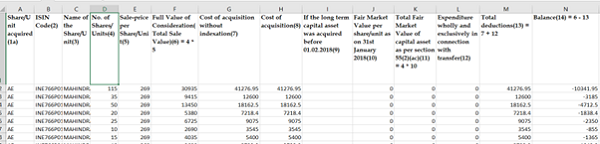
4.9 The total of Column N in the Excel sheet represents the Net Long-Term Capital Gain/Loss from the sale of equity. Additionally, the total sale consideration and Short-Term Capital Gain from this sheet will exactly match the amount shown in the AIS under “Sale of Securities”
5. Conclusion: It is highly recommended to cross-verify the details available in the AIS with the information provided by your broker. Any discrepancies found in the AIS can be reported using the feedback facility available on the AIS portal.
Disclaimer: The article is for educational purposes only.
The Author can be approached at [email protected]