The document explains the concept and utility of the Annual Information Statement (AIS) and Taxpayer Information Summary (TIS) under the Income-tax Act, 1961, as amended by theFinance Act, 2026. AIS serves as a comprehensive statement containing information relating to a taxpayer’s income, financial transactions, tax payments, tax deductions, and income-tax proceedings for a financial year. TIS provides a category-wise summary of the information available in AIS and displays both original and revised values after considering taxpayer feedback. The revised values reflected in TIS are used for pre-filling income tax returns, making accurate verification important. The document also outlines the process for accessing AIS and TIS through the Income-tax e-filing portal or the AIS mobile application. Taxpayers can review the information, identify inaccuracies, duplications, or mismatches, and submit feedback for correction. The guide emphasizes the role of AIS and TIS in improving transparency, ensuring accurate return filing, and facilitating tax compliance.
Accessing Taxpayer Information Summary (TIS) Online
Annual Information Statement (AIS) is a statement that provides complete information about a taxpayer for a particular financial year. Taxpayer Information Summary (TIS) is a category-wise taxpayer summary of such information.
AIS-TIS contains information about taxpayers’ incomes, financial transactions, tax details, income-tax proceedings, etc.
Taxpayer Information Summary (TIS)
Annual Information Statement (AIS) is a statement that provides complete information about a taxpayer for a particular financial year. Taxpayer Information Summary (TIS) is a category-wise taxpayer summary of such information.
AIS-TIS contains information about taxpayers’ incomes, financial transactions, tax details, income-tax proceedings, etc.
An assessee can access AIS/TIS information by logging into his income-tax e-filing account or through the mobile app “AIS for Taxpayer”. If he feels that the information furnished in AIS is incorrect, duplicated, or relates to any other person, etc., he can submit his feedback thereon.
Steps to access TIS information online
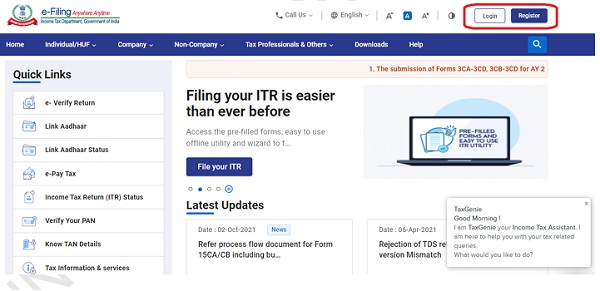
Step 1: Log in to the Income-tax e-filing website at https://www.incometax.gov.in/
If you are a new user, you will be required to first register on the e-filing portal.
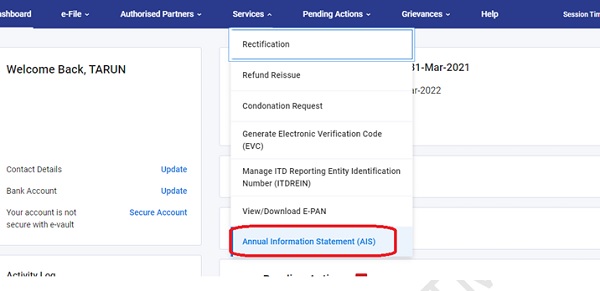
Step 2: After login, click on Services > Annual Information Statement (AIS)
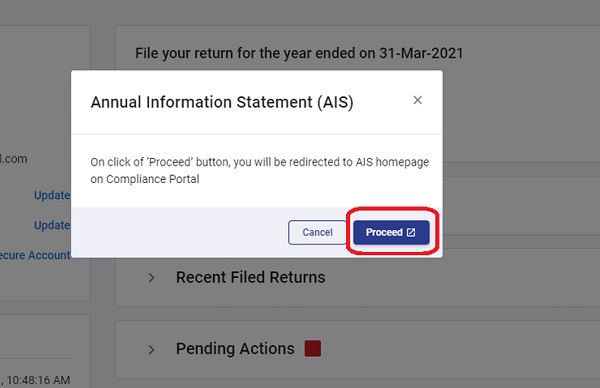
Step 3: A message shall appear that will prompt you to click on ‘proceed’ to redirect to the AIS homepage.
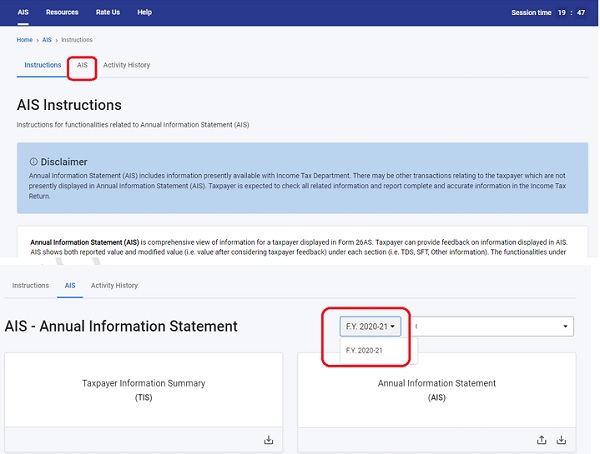
Step 4: The next screen provides key instructions relating to Annual Information Statement (AIS) and Taxpayer Information Summary (TIS). TIS displays the information available in AIS category-wise. It shows the original value as well as the revised value (i.e., the value processed after the taxpayer’s feedback). The revised values in TIS are used for prefilling of return.

Step 5: Click on the next tab of ‘AIS’. On the redirected screen, two tiles shall appear – Taxpayer Information Summary (TIS) and Annual Information Statement (AIS). Select the relevant financial year from the drop-down and click on the TIS tile to view the information.
Step 6: On the next screen, the information available in TIS is displayed.

Above document contains the provisions of the Income-tax Act, 1961, as amended by the Finance Act, 2026.
*****
Disclaimer: The contents of this document are for information purposes only. This aims to enable public to have a quick and an easy access to information and do not purport to be legal documents. Viewers are advised to verify the content from Government Acts/Rules/Notifications etc.
(Republished with amendments)