
GST TDS Rejection Error: “No Action Taken on TDS Details Rejected by Counter Party” – Practical Fix with GST Portal Screenshots
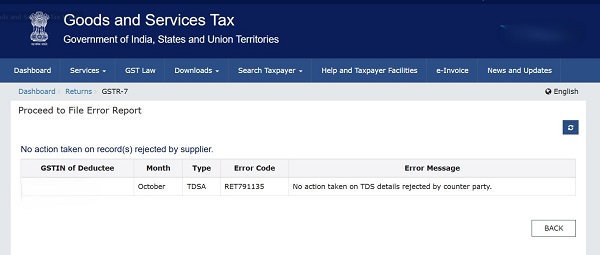
GST TDS compliance looks simple on paper, but in real practice, one small mismatch can block credits for months. One such commonly faced portal message is:
“No action taken on TDS details rejected by counter party”
This error is neither self-resolving nor technical in nature. It is a process-driven compliance gap which requires corrective filing by the deductor.
This article explains why this error appears, what it practically means, and how to fix it step-by-step, along with GST portal screen references for better clarity.
- Why Does This GST TDS Error Occur?
The flow of GST TDS is as follows:
- Deductor files GSTR-7
- TDS details flow to deductee
- Deductee rejects the TDS entry
- Deductor does not amend the rejected entry
- GST system flags the issue with the above error
Once rejected, the responsibility shifts entirely to the deductor to correct the mistake.
- Common Practical Reasons for Rejection
From field experience, the most common reasons include:
- Incorrect GSTIN of deductee
- Wrong tax period (month mismatch)
- Incorrect CGST / SGST / IGST break-up
- Excess or short TDS amount
- Duplicate reporting
- Important Clarification: No “Revised GSTR-7” Concept
Many taxpayers and even departments assume GSTR-7 can be revised. “There is no provision for revising GSTR-7.” Correction is possible only by amending the rejected entry in a subsequent month’s GSTR-7.
- Correct Method to Fix GST TDS Rejection (Step-by-Step)
1. Step 1: Open Returns Dashboard
- Login to GST portal
- Go to Services → Returns → Returns Dashboard
- Select the next open tax period
2. Step 2: Open GSTR-7
- Click Prepare Online under GSTR-7
3. Step 3: Go to Amendment Table
Navigate to: Table 4 – Amendments to TDS Details of Earlier Tax Period. This table is specifically meant for correcting rejected TDS entries.

4. Step 4: Enter Original & Corrected Details
You must:
- Enter original GSTIN and tax period
- Correct the error (GSTIN / month / tax amount / tax breakup)
- Save the details
Even a small mismatch will again result in rejection.
5. Step 5: File GSTR-7
- Verify details carefully
- File using DSC / EVC
- Pay differential liability, if any
- What Happens After Amendment?
- Corrected TDS flows again to deductee
- Deductee accepts the entry
- Amount gets credited to Electronic Cash Ledger
- Error disappears automatically and deductor can file the return
- Professional Advisory from Practice
- Deductees should reject TDS only when unavoidable
- Deductors must act immediately on rejection
- Maintain email trail and screenshots
- Never assume the error will auto-clear
Most GST TDS disputes arise not from tax evasion, but from procedural neglect.
Conclusion
The error “No action taken on TDS details rejected by counter party” is a compliance alert, not a system glitch. The GST portal expects the deductor to correct rejected entries through Table 4 of subsequent GSTR-7. Understanding this workflow and acting promptly can save months of follow-up, blocked cash flow, and audit objections.








Sir in our case, the option of accepting the TDS entries not available only on account of there are entries more than 500.please guide us to how we could see a data and accept the entries.
In cases where the number of TDS entries exceeds 500, the GST portal restricts bulk acceptance, and therefore the “Accept” option may not appear on a single screen.
To resolve this, you may please proceed as under:
A-1. Login to the GST portal and navigate to Services → Returns → GSTR-7 → TDS Credit Received.
2. Use the date-wise / deductor-wise filters to reduce the number of entries displayed to less than 500.
3. Once filtered, the Accept / Reject option will become visible, enabling you to act on the entries in batches.
B- Alternatively, you may download the TDS details in Excel, review the data offline, and then accept the entries in multiple batches through filtered views.
If you have any further queries or issues related to GST or Income Tax, particularly in litigation matters, feel free to contact me at the details mentioned below.
📞 Contact: +91-7893796315 📧 Email: [email protected]