Summary: Rule 37 of the CGST Rules requires reversal of Input Tax Credit (ITC) if payment to suppliers is not made within 180 days from the invoice date, creating significant compliance challenges for high-volume businesses. Manual tracking often leads to mismatches between purchase and payment records, resulting in blocked ITC and interest liabilities. Standard accounting software fails due to fragmented supplier records, incorrect aging based on voucher dates instead of invoice dates, and lack of linkage with ITC claim dates. The MSB Forensic Suite addresses these gaps by anchoring calculations to invoice dates, ensuring zero-variance reconciliation, identifying unallocated payments, and automating aging analysis. It also tracks ITC claim dates to compute accurate interest and provides predictive insights by identifying invoices nearing the 180-day threshold. The tool enables proactive payment planning, reduces audit risks, and ensures compliance by converting complex manual processes into a streamlined, automated system for accurate ITC monitoring.
The Challenge: The 180-Day Compliance Trap
Under Rule 37 of the CGST Rules, taxpayers must reverse Input Tax Credit (ITC) if they fail to pay a supplier within 180 days of the invoice date. For businesses with high transaction volumes—reaching turnovers of ₹8.3 to ₹9 crore—tracking this manually is a compliance nightmare. Discrepancies between purchase registers and payment entries often lead to “Blocked ITC” or heavy interest liabilities during audit.
The Compliance Gap: Why Standard ERPs Fail Rule 37
While most businesses rely on Tally or similar accounting software, there are three critical “blind spots” that leave taxpayers vulnerable to GST notices:
Fragmented Supplier Registers: Most clients do not maintain a disciplined “Bill-to-Payment” settlement. Without proper bill-wise allocation, determining which specific invoice is overdue becomes a manual guessing game.
The 180-Day Clock Error: Rule 37 mandates that the 180-day clock starts from the Date of Invoice. Tally and many other ERPs typically calculate “Bill Age” from the Voucher Booking Date. This discrepancy can lead to a 10–30-day lag, resulting in missed reversal deadlines.
The Missing ITC Claim Date: Identifying the “Age” is only half the battle. To calculate accurate Interest, a practitioner must know exactly when the ITC was claimed in GSTR-3B. Most software fails to link the payment status with the claim date, making interest computations forensic-heavy and prone to error.
The Solution: The MSB Forensic Suite (V16.0 GOLD)
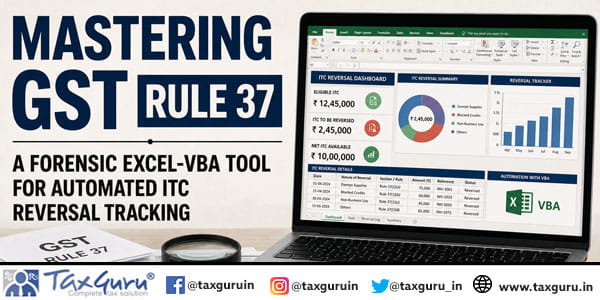
Developed by MSB Tax Consultancy, this Excel-VBA automated engine transforms raw data from Tally or BUSY into a forensic-grade audit trail. Unlike standard ledgers, this tool is designed specifically for Rule 37 compliance, ensuring that every rupee of your purchase history is mathematically accounted for. This automated engine was built to bridge these specific gaps. It transforms raw data into an audit-ready shield for high-turnover businesses.
Key Forensic Features
Forensic Anchor (Invoice Date Logic): Unlike standard reports, this tool anchors every aging calculation strictly to the Invoice Date, ensuring 100% alignment with Rule 37 statutory requirements.
Zero-Variance Reconciliation: The suite includes a RECON_SUMMARY that cross-verifies Total Purchases against Accounted Liabilities and Payments. It achieves a perfect 0.00 Variance.
Unallocated Payment Intelligence: It identifies “Advances to Suppliers” (Paid but Bill Not Received) and matches them against the client’s Trial Balance. This provides immediate justification for variance during a GST audit.
Automated Aging Buckets: The 180+ day bucket acts as an early warning system for ITC reversal and interest liabilities.
Why This Tool is a Game-Changer for CAs and Tax Pros
This tool doesn’t just list transactions; it provides a High-Level Audit Trail. It accounts for the ITC claim date—the most critical variable—to determine interest with pinpoint accuracy. By matching the client’s books with forensic precision, it turns a 3-day manual task into a 3-minutes automated process.
The “Predictive” Power of this Tool
Most GST reports focus on the “Damage Assessment”—showing you what you have already failed to pay within 180 days. The MSB Forensic Suite goes a step further by introducing the Future Liabilities Tracker.
Anticipatory Planning: The tool identifies every booked invoice that has not yet reached the 180-day threshold.
Cash Flow Optimization: By knowing exactly which invoices are approaching the 60, 90, or 120-day mark, management can prioritize payments to suppliers before they hit the “Rule 37 Danger Zone.”
Interest Prevention: The ultimate goal of this feature is to ensure the Future Liabilities identified in your summary never turns into a reversal entry. Paying even one day before the 180-day deadline saves the business 18% per annum in interest costs.
Pro-Tip: The GSTR-2B Prerequisite for Rule 37
Before running your 180-day reversal engine, there is one non-negotiable step: GSTR-2B Reconciliation. Rule 37 specifically governs the reversal of an ITC that has been “availed.” If you find an unpaid invoice that is 180+ days old, but your GSTR-2B reconciliation shows that the supplier never uploaded that invoice (or it was marked as “Ineligible” at the time), you likely haven’t claimed that ITC yet. (In simple words, those transactions will never be included in your reports.)
Frequently Asked Questions (FAQ)
Q1: Most ERPs calculate aging from the Voucher Date. How does this tool handle the 180-day Rule 37 deadline?
Standard software often defaults to the date the entry was made. The MSB Forensic Suite overrides this by strictly anchoring its calculation to the Invoice Date. This ensures that the 180-day countdown is legally accurate, preventing premature or delayed reversals.
Q2: How does the tool help in calculating accurate interest on reversals?
The most critical variable for interest is not just the payment date, but the ITC Claim Date. Our suite tracks when the credit was actually utilized in GSTR-3B. By linking this to the payment status, the tool determines the exact period of default, ensuring interest is calculated forensic-style—never a rupee more, never a rupee less.
Q3: What happens to “Advances to Suppliers” where a bill hasn’t been received yet?
These often create a “variance” in standard reconciliations. The suite identifies these as Unallocated Payments and categorizes them into aging buckets (0-30, 31-90, 91-180, and 180+ days). This allows the practitioner to match the tool’s output directly with the client’s Trial Balance for “Advances to Suppliers,” maintaining a clean audit trail.
Q4: Can the tool handle partial payments against a single large invoice?
Yes. The engine uses a Cumulative Balance Logic (Previous Balance + Credit – Debit). This ensures that even if an invoice is settled across multiple payment dates, the tool correctly tracks the “Paid” vs “Outstanding” portion for each specific aging window.
Q5: Is this tool compatible with data exported from Tally or BUSY?
Absolutely. The VBA engine is built to process raw data exports. It includes a “Date-Type Lock” to prevent regional format errors (like 10-01 becoming 01-10), making it robust enough to handle data from any accounting environment.
Q6: What is the difference between “Rule 37 Audit” and “Future Liabilities” in your report?
The Rule 37 Audit section captures invoices that have already crossed the 180-day limit, where ITC reversal and interest are now mandatory. Future Liabilities are “Current” invoices—booked in your books but still within the 180-day window. Tracking them allows the client to settle payments strategically and avoid reversals entirely.
Q7: How does this help with working capital management?
By viewing the Future Liabilities bucket alongside Unallocated Payments, the Accounts Manager can see where they have excess funds sitting as advances and where they have upcoming payment deadlines. This allows for the “re-allocation” of funds to clear the oldest invoices first, keeping the business’s GST compliance rating high.