
Summary: Deductors attempting to reset their password on the TRACES portal may encounter difficulty when asked to provide their original TAN allotment date. The TAN may have been obtained several years earlier, the allotment letter may no longer be available, or the employee responsible for TAN registration may have left the organisation. Without recovering the relevant details and completing the portal’s verification requirements, deductors may face difficulties accessing Form 16 and Form 16A, filing correction statements and downloading justification reports. The TAN allotment date can be retrieved through two practical methods. Where the deductor has an active TAN login on the Income Tax e-filing portal, the date may be available in the Profile section. Alternatively, the deductor can contact the Protean TIN helpdesk at 020-2721-8080, keeping the TAN and the registered name of the TAN holder ready for verification. Once the allotment date is obtained, it can be entered in the required format on the TRACES password recovery screen, followed by the applicable OTP verification and password reset steps. Maintaining a centralised compliance record containing TAN allotment details, registered contact information and authorised account credentials can help organisations avoid repeated access difficulties and interruptions in TDS compliance.
How to Find TAN Allotment Date for TRACES Password Reset
You click “Forgot Password” on TRACES, enter your details, and the portal asks for one thing you probably do not have at hand: the date of TAN allotment.
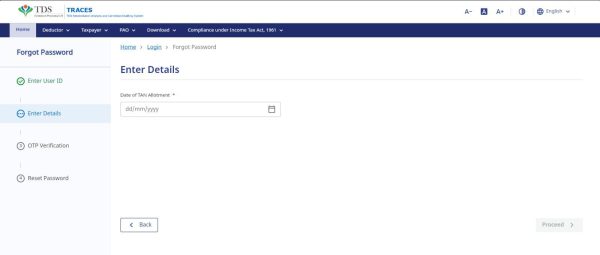
This is a common roadblock for deductors. The TAN was often obtained years ago, the allotment letter has gone missing, or the person who dealt with it has left the organisation. Until the date is entered correctly, the password cannot be reset, and that means no correction statements, no Form 16 or 16A downloads, and no access to defaults or justification reports.
The date is not lost. There are two ways to get it.
Option 1: If You Can Log In to the Income Tax Portal with Your TAN
Many deductors have a working TAN login on the Income Tax e-filing portal even when the TRACES password is gone. If you do:
1. Log in to the e-filing portal(https://eportal.incometax.gov.in/iec/foservices/#/login) using your TAN
2. Go to the Profile section.
3. You will find the Date of TAN Allotment there.

Note the date and enter it on TRACES in the format the portal asks for.
Option 2: If You Do Not Have the TAN Login Either
Call the Protean (formerly NSDL) TIN helpdesk on 020-2721-8080. Before you call, keep two things ready:
- your TAN
- the name of the TAN holder, exactly as it is recorded
Give these details to the executive, and the date of TAN allotment is told to you on the call. Write it down as it is said, then go back to TRACES.
After You Have the Date
Enter it on the TRACES reset screen, complete the verification with the OTP on your registered mobile number, and set the new password.
Do one more thing while it is fresh: save the date, along with the TAN, user ID and registered mobile and email, in your compliance file. Most of the trouble in these cases starts because these details sit with one person and nobody else knows them.