A. FAQs on Form GST ANX-1: Annexure of Supplies
About Form GST ANX-1
Q.1 What is Form GST ANX-1?
Ans. Form GST ANX-1 contains details of outward supplies, inward supplies liable to reverse charge and import of goods and services. It is an annexure to the return to be filed by a regular taxpayer.
Q.2 What are the pre-requisites for uploading details in Form GST ANX-1?
Ans. Pre-requisites for uploading details in Form GST ANX-1 are:
1. Taxpayer should be registered as regular taxpayer for the tax period.
2. Taxpayer should have valid login credentials (i.e. User ID and password).
3. For cancelled/surrendered GSTIN, taxpayer will be able to upload documents for period during which he/she remains as active taxpayer.
Filing Options in Form GST ANX-1
Q.3 What are the different types of filing options available to the taxpayer?
Ans.
1. Monthly Filer: Taxpayer whose aggregate turnover was more than Rs. 5 crores in the preceding financial year, will need to file the monthly return Form GST RET-1. Form GST ANX-1 for such taxpayer will have Table 3 (3A to 3L) and Table 4.
2. Quarterly Filer: Taxpayer whose aggregate turnover was upto Rs. 5 crores in the preceding financial year will have an option to file return on quarterly basis. Such taxpayer may opt to file at monthly frequency also. There will be three types of quarterly returns, namely:
a) Sahaj – Taxpayer making B2C supplies only can opt for filing quarterly return under this category. Facility to report inward supplies liable to reverse charge will also be available under this category. The Form GST ANX-1 of such taxpayer will have Table 3A and 3H only.
b) Sugam – Taxpayer making B2C and B2B supplies can opt for this category of quarterly return filing. Facility to report inward supplies liable to reverse charge will also be available under this category. The Form GST ANX-1 of such taxpayer will have Table 3A, 3B and 3H only.
c) Quarterly (Normal) – Taxpayer opting quarterly filing of return but not opting for Sahaj or Sugam return will fall under this category. Format of return and annexure will be same as for the monthly filer.
Uploading Details in Form GST ANX-1
Q.4 What details in Form GST ANX-1 can be entered by taxpayer on the GST Portal?
Ans. Details for following Tables of Form GST ANX-1 can be entered by taxpayer on the GST Portal:
- 3A- Supplies to unregistered persons/consumers (B2C)
- 3B- Supplies to registered persons (B2B)
- 3C & 3D- Exports with/without payment of tax (EXP WP/WOP)
- 3E & 3F- Supplies to SEZ with/without payment of tax (SEZ WP/WOP)
- 3G- Deemed exports (DE)
- 3H- Inward supplies attracting reverse charge (RCM)
- 3I- Import of services (IMPS)
- 3J- Import of goods (IMPG)
- 3K- Import of goods from SEZ units/developers (IMPG SEZ)
- 4- Supplies made through e-commerce operators
Q.5 Can I edit details in Form GST ANX-1?
Ans. You can edit any details in Form GST ANX-1 except in following cases:
1. Documents added in Table 3B, 3E, 3F and 3G with supplier type as ‘Regular taxpayer’, can be edited till the cut-off date (i.e., 10th of the following month subsequent to the tax period).
2. Once a document is accepted by the recipient, you cannot edit the accepted document.
3. The details uploaded in Form GST ANX-1 can be edited post the return for the period is filed.
Q.6 How to enter details of Credit or Debit Notes, I do not find any table for the same?
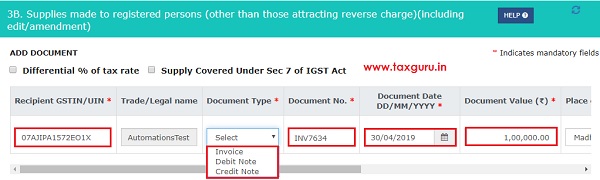
Ans. There are no separate tables for Credit or Debit Notes. In relevant tables there is a dropdown for selecting ‘Document Type’. If applicable Credit or Debit Note may be selected from this dropdown.
Q.7 Do I need to file Form GST ANX-1?
Ans. You do not need to file Form GST ANX-1. You only need to upload details in Form GST ANX-1. Form GST ANX-1 will be deemed filed along with filing of return for the period.
Q.8 Are documents uploaded by Supplier in Form GST ANX-1 reflected on a real time basis in Form GST ANX-2?
Ans. Documents uploaded by Supplier in Form GST ANX-1 are reflected to a registered recipient on a real time basis in his Form GST ANX-2.
Q.9 Is there any interest or late fee on late uploading of details in Form GST ANX-1?
Ans. Interest would be applicable on late reporting of liabilities (i.e. Documents pertaining to earlier period). Interest would be applicable for documents pertaining to this period for any delay beyond the due date of return. Interest as applicable needs to be declared and paid in return. There is no separate late fee for Form GST ANX-1.
B. Manual on Form GST ANX-1: Annexure of Supplies
Note: In this document, the features which are not currently available in Trial version is highlighted in Grey text.
To prepare Annexure in Form GST ANX-1:
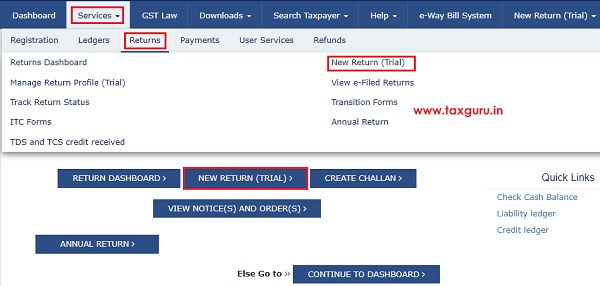
1. Login to the GST Portal. Navigate to Services> Returns> New Return (Trial). Alternatively, select NEW RETURN (TRIAL) on the dashboard.
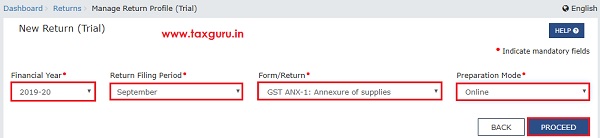
2. Select Financial Year, Return Filing Period, Form/Return and Preparation Mode from the drop-down list and click PROCEED.
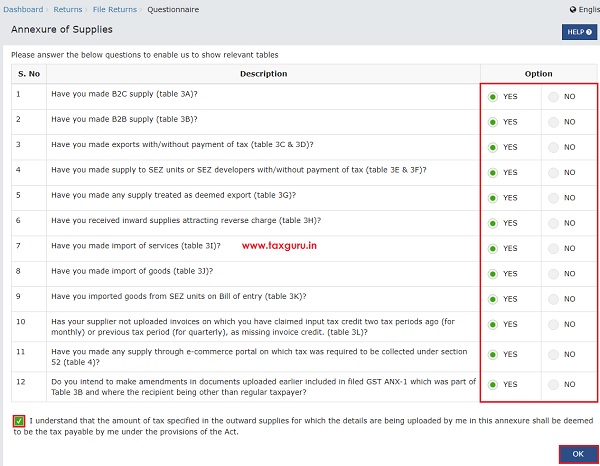
3. Questionnaire page will be displayed with list of questions. You need to answer all the questions to show only the relevant tables applicable to you in ‘Select table to Add details’ drop-down list. Select the declaration checkbox and click OK.
Note:
- Questionnaire needs to be filled only for the first time. To add or remove tables later, click the ADD/REMOVE TABLES button in ANX-1 Dashboard page. You will be navigated back at the ANX-1 Questionnaire page.
- Changing your selection from ‘YES to ‘NO’ would not auto delete the added details, if any. Taxpayer needs to manually delete such records.
4. From the ANX-1 DASHBOARD, select the appropriate table from the drop-down list to enter/ edit/ view details. Here, in this example, we will discuss about Table 3B- Supplies to registered persons (B2B) to enter details related to supplies to registered persons.
Note: This table includes supplies made through e-commerce operators liable to collect TCS under section 52. The same details also need to be entered in table no. 4.

5. Select the applicable check-boxes “Differential % of tax rate” or “Supply covered under sec 7 of IGST Act”. Based on your selection, relevant fields get displayed.
Note: Select Differential % of tax rate and Supply Covered Under Sec 7 of IGST Act only if it’s applicable.

6. Enter the supply data in the relevant fields and click the Add “+”button.
7. On clicking the Add “+” button, Item Details field gets displayed. Enter the item details in the relevant fields and click the Add “+” button to add more rows. Once all the details are added, click SAVE DOCUMENT.
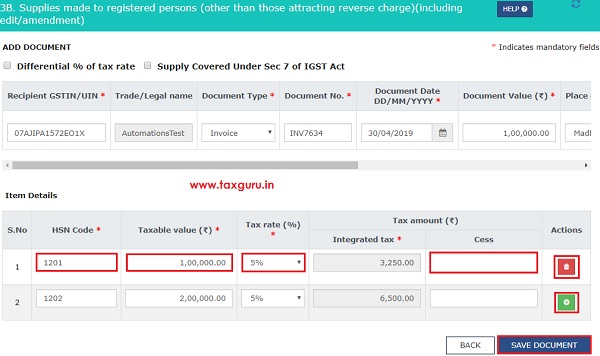
Note: You may add or delete data using the icons in the Actions column.
8. On click of SAVE DOCUMENT, a success message is shown for completion of save request. The details of document will be further validated by GST Portal and will be added to ‘Pending Records’table till such validation is completed. Post successful validation, document gets added into the Processed records (Validated successfully)section of this page.
You may refresh the page to see the most updated status of documents. In case, the documents are processed with error, it would be available in ‘Pending Records’ table with status as ‘Processed with error’. You may click edit to see the error and correct the same.
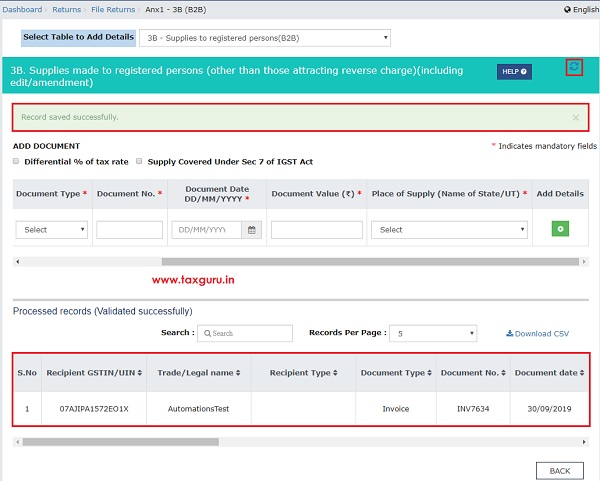
Note:
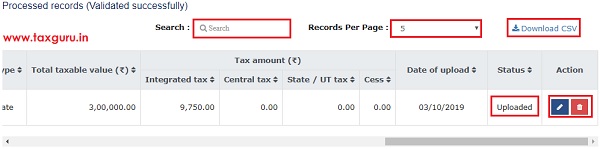
- Status of the uploaded records are updated to “Uploaded”.
- You can click the Edit/ Delete icons under the Actions column to edit or delete the details once added.
- To search in the list of the added records, enter the relevant text/value in the Search field and click the Search icon.
- To view records per page, select the required number from the drop-down list of “Record Per Page” field.
- You can click the Download as CSV link to download the added details in CSV format.
9. Once you have added details in Table – 3B, navigate back to ANX-1 DASHBOARD to see consolidated summary or select another table from drop-down list to add details.

Following tables have been part of Beta release, as on date (10th September, 2019).
| S.No. | Table Name | Point to Be Noted | Applicable For |
|---|---|---|---|
| 1. | 3A- Supplies to unregistered persons/consumers (B2C) |
|
|
| 2. | 3B- Supplies to registered persons (B2B) |
|
|
| 3. | 3H- Inward supplies attracting reverse charge (RCM) |
|
|
Following tables will be part of subsequent Beta releases.
| S.No. | Table Name | Point to Be Noted | Applicable For |
|---|---|---|---|
| 1. | 3C & 3D- Exports with/without payment of tax (EXP) |
|
|
| 2. | 3E & 3F- Supplies to SEZ with/without payment of tax (SEZ) |
|
|
| 3. | 3G- Deemed exports (DE) |
|
|
| 4. | 3I- Import of services (IMPS) |
|
|
| 5. | 3J- Import of goods (IMPG) |
|
|
| 6. | 3K- Import of goods from SEZ units/developers (IMPG SEZ) |
|
|
| 7. | 4- Supplies made through e-commerce operators |
|
|
10. Navigate BACK to go to the “ANX-1 DASHBOARD” page. On this page:
11. Click ‘View Consolidated Summary’to see the available consolidated summary of complete Form GST ANX-1. In case, the available summary is not the most updated summary; a message will be shown indicating the same. Click on the here link present in the message to generate the updated summary. Updated summary is generated and summary generation date and time is reflected on the screen.
13. Click the DOWNLOAD GST ANX-1 SUMMARY (PDF)/ DOWNLOAD GST ANX-1 DETAILS (EXCEL)button to download Form GST ANX-1 summary in PDF or Excel format.
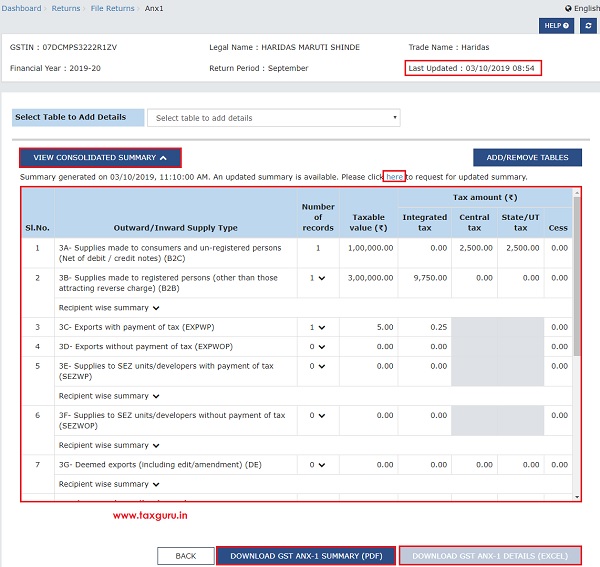
14. Navigate BACK to go back to the New Return (Trial) page.
Once details are uploaded in Form GST ANX-1, you do not need to file Form GST ANX-1. Form GST ANX-1 will be deemed filed along with filing of return for the period. Documents uploaded by Supplier in Form GST ANX-1 are reflected on a real time basis in Form GST ANX-2.
Also Read-
| S. No | Particulars |
|---|---|
| 1 | All about New GST Returns Dashboard with FAQs |
| 2 | All about Online Upload /Download of Form GST ANX-1 JSON File |
| 3 | Form GST ANX-1: Annexure of Supplies- FAQs/Manual |
| 4 | All about Online Upload and Download of Form GST ANX-2 JSON File |
| 5 | Form GST ANX-2: Annexure of Inward Supplies- FAQs/Manual |