Summary: This article explains the procedure for creating and managing stock groups and stock items using TallyPrime, along with recording Goods and Services Tax (GST) transactions and preparing accounting reports. It describes how stock groups help classify similar inventory items and how individual stock items are created for effective inventory management. Step-by-step instructions are provided for creating, displaying, altering and deleting stock groups and stock items through the Gateway of Tally, supported by screenshots and tables. The article also covers the basic configuration required for GST accounting, including enabling GST, creating tax ledgers for Input CGST, SGST and IGST and Output CGST, SGST and IGST, and recording purchase and sales transactions through appropriate vouchers. Illustrative journal entries explain the accounting treatment of intra-state and inter-state purchases and sales. Additionally, the article introduces budgeting and forecasting through accounting software, highlighting how TallyPrime assists businesses in preparing financial plans, allocating resources and comparing actual performance against budgets. Overall, the article serves as a practical introductory guide for students, accounting professionals and businesses seeking to understand inventory management, GST accounting and budgeting functions in TallyPrime.
- 1. Stock Group
- 2. Procedure for Creating Stock Groups.
- 3. Display, alter, and delete the Stock Groups.
- 4. Creation of Stock items
- 5. Display, alter, and delete the Stock Items.
- 6. Accounting for Goods and Service Tax.
- The following are the important journal entries in case of GST.
- A.Intra-state purchase
- B. Inter -state purchase
- C. Intra-state Sale
- D. Inter- State Sales
- 7. Budgeting and forecasting using accounting software.
1. Stock Group
A Stock Group is used to classify similar stock items for systematic inventory management and reporting.
Example:
- Stock Group: Concrete
- Stock Item: Cement
- Stock Item: Sand
- Stock Item: Rocks
2. Procedure for Creating Stock Groups.
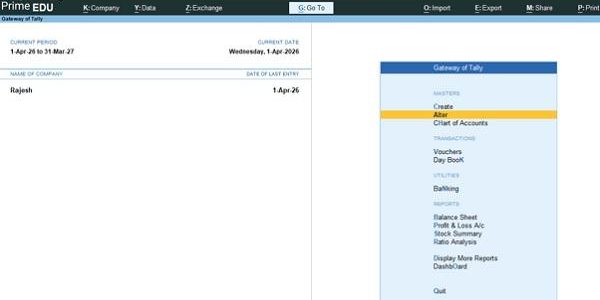
Fig:1. Gateway of Tally
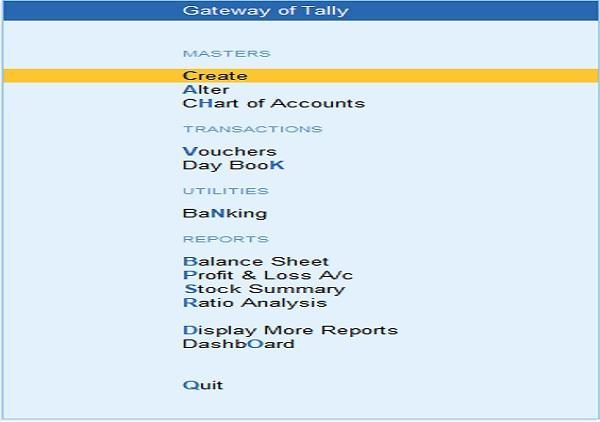
(Source: TallyPrime)
The following are the important steps in the creation of stock groups
Step I: Gateway of Tally
Step II: Create
Step III. List of Masters
Step IV. Inventory Masters
Step V: Click on Stock Group
Then fill in all the details.
Fig:2. Stock Group
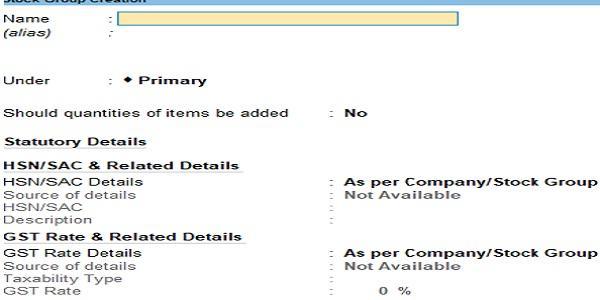
(Source: Tally Prime)
Fig:3. Stock Group
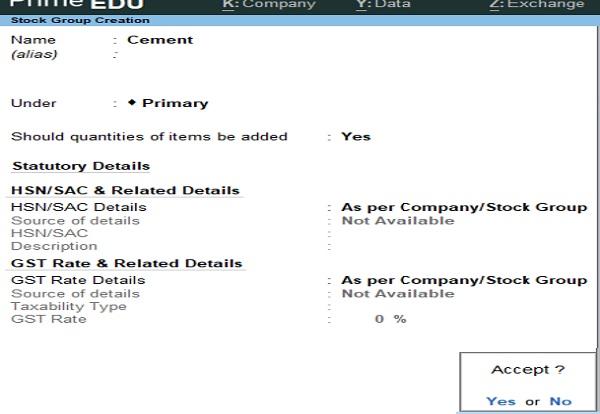
(Source: Tally Prime)
Then please accept and complete it.
3. Display, alter, and delete the Stock Groups.
The following table shows the steps involved.
Table No:1
| Display | Gateway of Tally—–Click on Chart of Accounts—- List of Masters—- Inventory Masters—- Click on Stock Groups |
|---|---|
| Alter | Gateway of Tally—-Click on Alter— List of Masters—- Inventory Masters —–Click on Stock Groups, then alter the needed. |
| Delete | Gateway of Tally—-Click on Alter—- List of Masters — Inventory Masters —–Click on Stock Groups. Then press Alt+D |
4. Creation of Stock items
A Stock Item is an individual product or material that a business purchases, stores, or sells.
The following are the important steps in the creation of stock items.
Step I: Gateway of Tally
Step II: Click on Create.
Step III. List of Masters
Step IV. Inventory Masters
Step V: Click on Stock Item
Then fill in all the details.
Fig:4. Stock Item
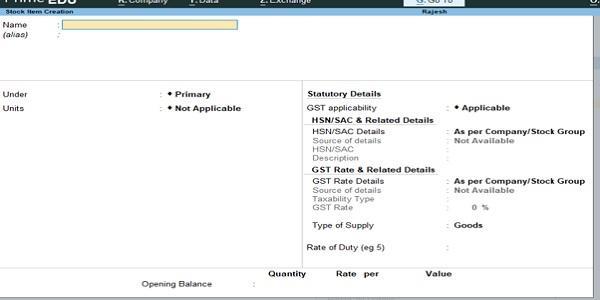
(Source: Tally Prime)
Then please accept and complete it.
5. Display, alter, and delete the Stock Items.
The following table shows the steps involved.
Table No: 2
| Display | Gateway of Tally—Click on Chart of Accounts — List of Masters—- Inventory Masters. Click on stock Item |
|---|---|
| Alter | Gateway of Tally—Click on Alter —-List of Masters —- Inventory Masters— Click on Stock item. Then press Alter. |
| Delete | Gateway of Tally—-Click on Alter—- List of Masters — Inventory Masters— Click on stock item. Then Alt+D. |
6. Accounting for Goods and Service Tax.
The following are the key steps for accounting for Goods and Services Tax.
Step I: Enable GST in company creation.
Step II: Create the following group.
Duties and Taxes GST.
Step III: Then create the following GST Ledgers under the group Duties and Taxes GST.
Fig:5. GST Ledgers
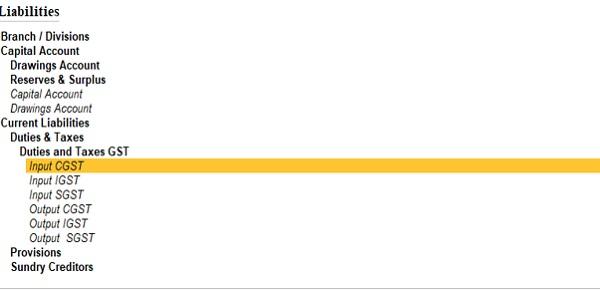
(Source: Tally Prime)
a. Input CGST
b. Input SGST
c. Input IGST
d. Output CGST
e. Output SGST
f. Output IGST
Step IV. Create stock groups and stock items
Step V. Voucher entry
a.Use a Purchase voucher to record purchases.
b. Use a Sales voucher to record sales.
Step VI. Prepare GST Reports.
The following are the important journal entries in case of GST.
A.Intra-state purchase
Purchases A/C………………………………………..Dr
Input SGST A/C………………………………………..Dr
Input CGST A/C………………………………………Dr
To Supplier A/C
B. Inter -state purchase
Purchases A/C…………………………………………..Dr
Input IGST A/C………………………………………….Dr
To Supplier A/C
C. Intra-state Sale
Customer A/C……………………………………………..Dr
To Output SGST A/C
To Output CGST A/C
To Sales A/C
D. Inter- State Sales
Customer A/C………………………………………………..Dr
To Output IGST A/C
To Sales A/C
7. Budgeting and forecasting using accounting software.
Budgeting is the process of preparing a financial plan for a future period by estimating income, expenses, sales, purchases and cash requirements.
Accounting software such as TallyPrime helps businesses prepare budgets, allocate resources and compare actual performance with planned performance.