Summary: This article explains the essential procedures for creating and managing a company and preparing accounts using Tally Prime. It describes how the software can be used for maintaining accounting records of sole proprietorship concerns, partnership firms, limited liability partnerships, companies, trusts and co-operative societies. The article begins with the process of creating a new company through the Gateway of Tally, entering the company name, mailing name, address, state, PIN code and contact information, and accepting the details. It also explains how users can select an existing company, modify company information and delete a company when required. The article further discusses the importance of accounting groups and ledgers in maintaining financial records. Groups classify ledgers according to their nature and facilitate the preparation of the Trading Account, Profit and Loss Account and Balance Sheet. The article describes predefined groups, primary groups and subgroups, along with the procedures for creating and altering groups through Accounting Masters. It also explains the role of ledgers as individual account heads used to record business transactions and provides the steps for creating and modifying ledger accounts. Another important aspect covered is voucher entry in Tally Prime. Accounting vouchers are used to record transactions such as receipts, payments, purchases, sales, contra entries and journal adjustments. The article identifies the principal voucher categories and explains their purposes in recording cash, bank and other accounting transactions. It also highlights the importance of selecting the appropriate voucher type and ledger while maintaining accounting records. Finally, the article explains the preparation of final accounts using transactions recorded in Tally Prime. It identifies the Profit and Loss Account, Balance Sheet, ratio analysis and Cash Flow Statement as important accounting reports accessible through the software. These reports help users determine business profitability, assess financial position and review financial performance. Overall, the article provides a practical introduction to company administration, accounting masters, voucher recording and financial reporting in Tally Prime. The following paragraphs explain the various details related to the creation of a company in Tally Prime.
1. Creation of a New Company
Applying Indian Accounting Standards requires more sophisticated software. Here, the term company refers to any of the following businesses that follow traditional accounting methods. Yet Tally Prime follows generally accepted accounting principles except Ind AS, etc.
1. Sole Proprietorship Concern
2. Partnership Firm
3. Limited Liability Partnership Firm
4. Company
5. Trust
6. Co-operative Society.
7. The following are the important steps:
A. Step I: Gateway of Tally
B. Step II: Click on the Create menu in the Company main menu
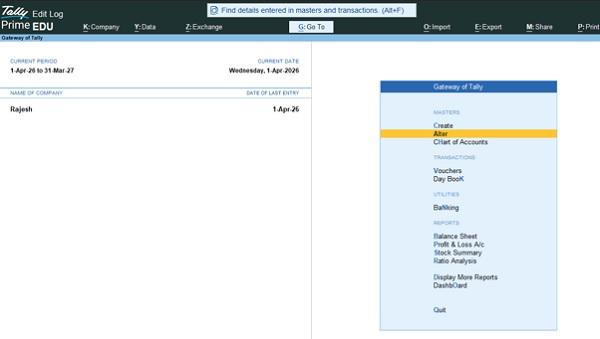
Fig:1. Gateway of Tally
(Source: TallyPrime).
Fig:2. Company
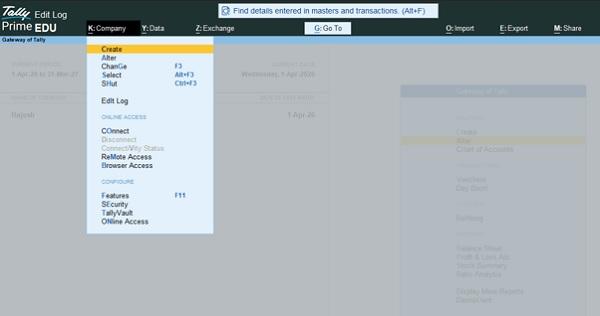
(Source: TallyPrime).
Step IV: Then fill all details
Fill in the following information:
- Company Name
- Mailing Name
- Address
- Country and State
- PIN Code
- Telephone Number and Email.
Fig:3. Company Details
(Source: TallyPrime).
Step V: Accept all details.
2. Selecting a Company
The following are the important steps:
A. Step I: Gateway of Tally.
B. Step III: Click on the Select menu in the Company main menu.
Then you can view all existing companies and click on the name of the company needed.
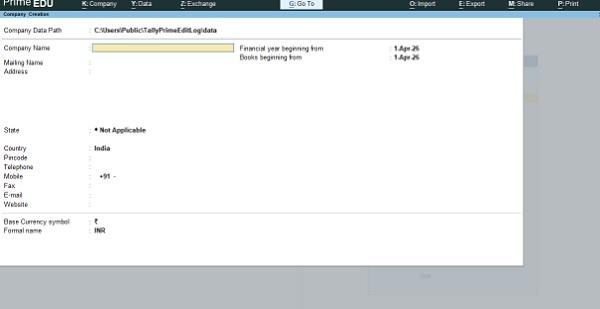
Fig:4. Existing Company Details
(Source: TallyPrime).
Fig:4. Existing Company Details
(Source: TallyPrime).
3. Altering a Company
It requires the following steps.
A. Step I: Gateway of Tally
B. Step II. Click on Select in the company main menu, select the company, and alter the details needed by the user.
Fig:5. Company menu
(Source: TallyPrime)
4. Delete a Company
It requires the following steps.
A. Step I: Gateway of Tally
B. Step II. Click on Select in the company main menu, select the company, and click on alter the company.
Press Alt + D to delete the company.
5. Accounts Groups
Groups are a collection of ledgers having the same nature. In Tally, creating groups is very important. You cannot prepare the Trading Account, P/L Account, and Balance Sheet without the groups. In Tally, by specifying the groups, you can post ledgers in the Trading Account, P/L Account, and Balance Sheet.
Pre-defined Groups in Tally: By default, Tally provides a list of Groups called pre-defined groups. Some version of TALLY gives 28 pre-defined groups. 15 Main groups and 13 sub-groups. The user can create any number of Primary Groups and Sub Groups, which are again grouped under a Primary Group/Sub Group.
There are certain pre-defined groups in TALLY. You can create a single group or multiple groups in TALLY. You can create a number of groups based on your requirements.
Fig:6. List of Groups
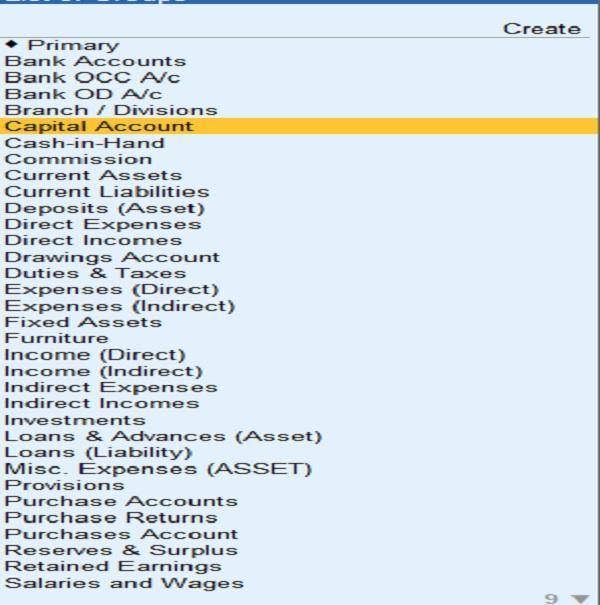
(Source: TallyPrime)
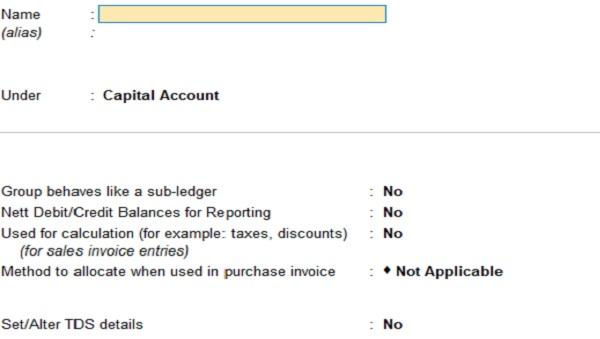
If there is no group, then you can create a group as per your needs. The following are the important steps.
Step 1: Take the Gateway of Tally
Step 2. Click on Create
Step3: Accounting Masters
Step 4: Click on Group.
Fig:7. Group
(Source: TallyPrime)
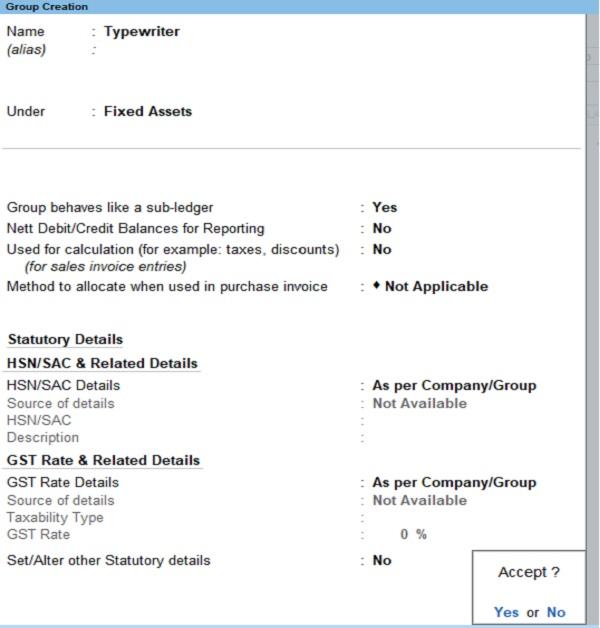
Important Instructions concerning Group creation
Question: Group behaves like a sub-ledger
Answer-Yes
Example: Typewriter account under the fixed assets account.
Fig:8. Group
(Source: TallyPrime)
Then click on Accept.
Altering a Group
To alter a group, (Correct spelling mistakes, add details are known as Altering), the following sequence is needed. Gateway of TALLY > Accounting Masters > Groups > Alter.
6. Ledgers
A Ledger is the actual account head to which you identify a transaction and must be used in all Accounting Vouchers. Without a ledger, we can’t record any transactions. All Ledgers have to be classified. Classifying ledgers into the appropriate groups is very important. These Groups and Ledgers are classified into Profit & Loss or Balance Sheet. We explained the creation and use of Groups in Tally earlier. Now you will learn how Tally works with Ledger. A ledger is a heading used to store accounting transactions. A collection of Ledgers is known as Groups.
(Source: TallyPrime)
If there are no pre-defined ledgers suitable to your needs, then you can create a ledger as per your needs. The following are the important steps.
Step 1: Take Gateway of Tally
Step 2. Click on Create
Step 3: Accounting Masters
Step 4: Click on Ledger
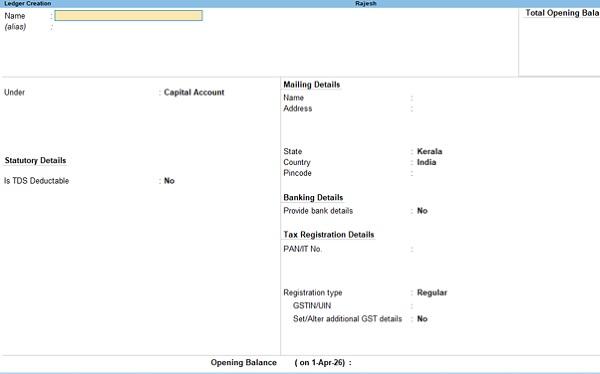
Fig:9. Ledger
(Source: TallyPrime)
7. Alter Ledger
Alter option permits you to alter the information.
Click on the Alter option. The Following is the procedure
Go to Gateway of Tally > Alter > Accounting Masters > Ledgers.
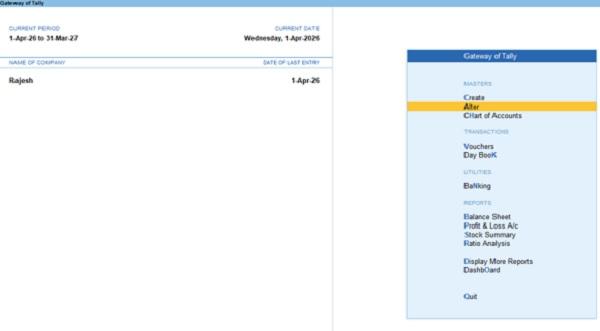
(Source: TallyPrime)
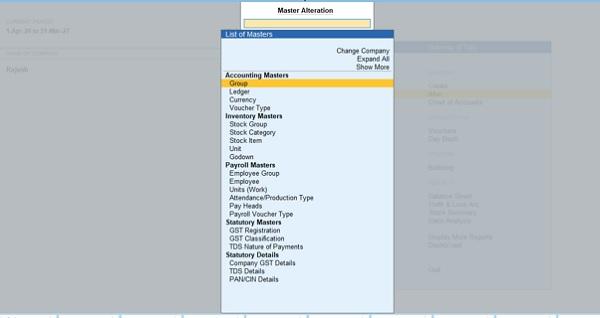
Fig:10. Ledger
(Source: TallyPrime)
Fig:11. Ledger
(Source: TallyPrime)
8. Voucher Entry
A voucher in TallyPrime is a document or entry screen used to record business transactions such as purchases, sales, payments, receipts and journal adjustments.
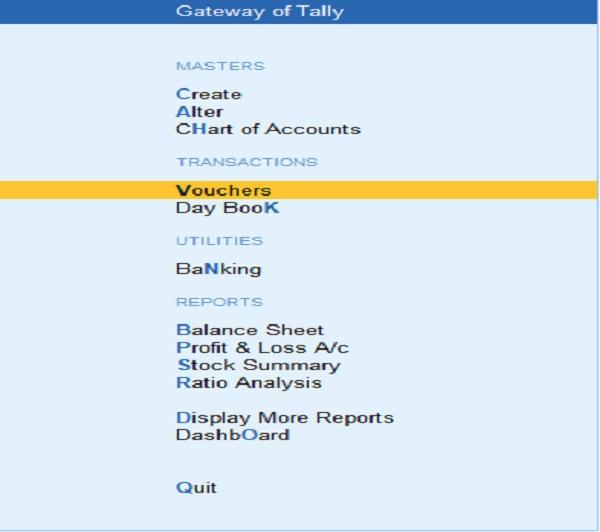
Step I: Gateway of Tally
Step II: Vouchers
Fig:12. Vouchers
(Source: TallyPrime).
Fig:13. Vouchers
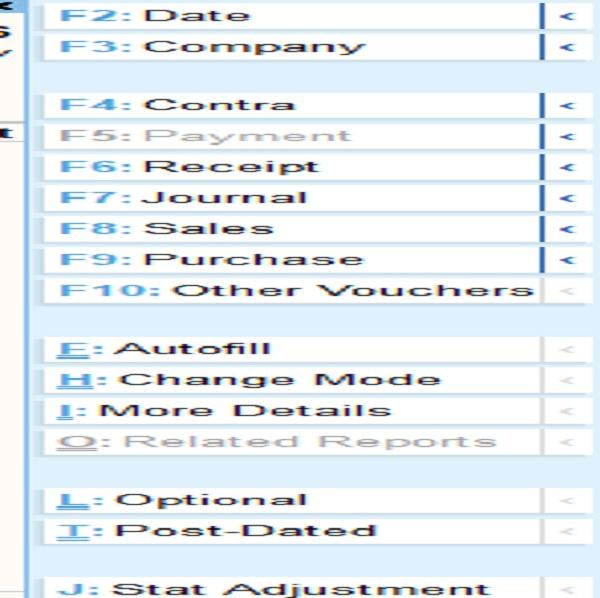
The following table shows the details of voucher entries.
Table No:1
| Voucher | Purpose |
|---|---|
| Account: Cash
Receipt Payment |
Only cash Receipt Only Cash Payment |
| Account: Bank
Receipt Payment |
Only Cash Receipt Only Bank Payment |
| Contra- | Transaction involving bank and cash accounts. |
| Journal | For recording journal proper transactions |
| Sales
Purchases |
Sales
Purchases |
9. Final Accounts
Final Accounts are financial statements prepared at the end of an accounting period to determine the profit or loss of a business and its financial position.
In TallyPrime, final accounts are prepared using the transactions recorded through accounting vouchers and ledgers.
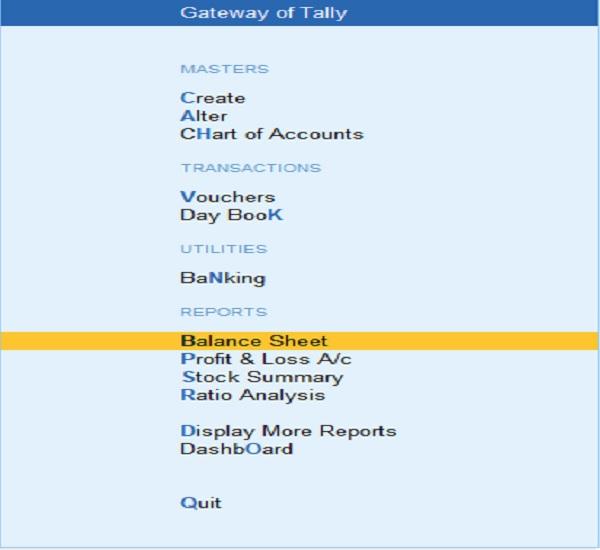
The following statements can be seen on the gateway of TallyPrime.
Fig:14. Final Accounts
(Source: TallyPrime)
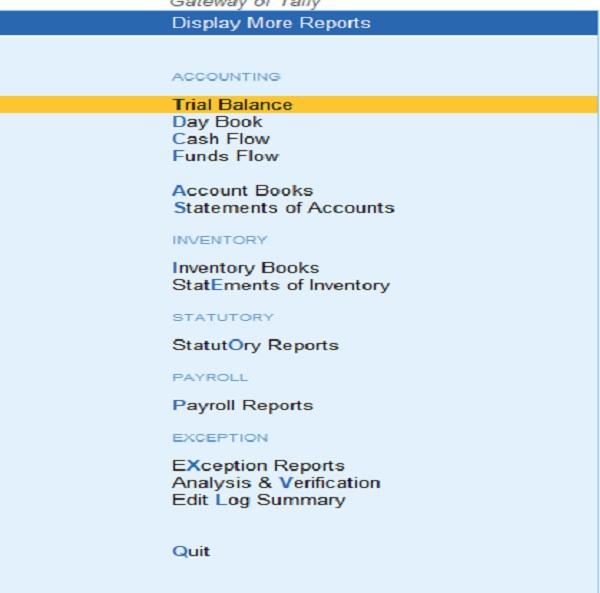
Other statements can be seen in the Menu Display More Reports.
Fig:15. Final Accounts
(Source: Tally Prime)
Author: CS, CMA, Dr. SIVAKUMAR. A, FCMA |Assistant Professor of Commerce | Sree Neelakanta Govt. Sanskrit College, Pattambi.