#AD
Pinterest lets you save images from the share menu, but it offers no such option for videos. Anyone who needs the file on their own device has to use an external tool.
Pinpea is one of them. This review covers what it solves, where its limits are, and what alternatives exist for Pinterest video download without installing anything.
What Pinpea Is

Pinpea is a web page that pulls public content from Pinterest. The user pastes a pin link and gets the file back. It requires no registration, no email address and no installation, and it applies no download cap.

Three use cases account for most of its traffic: saving content to view offline, gathering reference material in a local folder, and sharing a video with someone who has no account on the platform.
How Pinpea Pinterest Downloader Works

Processing starts as soon as the link is pasted, with no button to press. A window then opens with the file ready to preview and save.
When a link contains several images, Pinpea shows a single button that downloads all of them at once. None of the alternatives covered here include that function: on the others, each image has to be opened and saved separately. On a twelve-photo carousel, that is one download against twelve.
Where the file lands depends on the operating system. Android saves it to the downloads folder and indexes it in the gallery automatically. On iOS it goes to the Downloads folder inside the Files app, from where the user has to open it and choose the option to save it to Photos.
Supported Link Formats of Pinpea
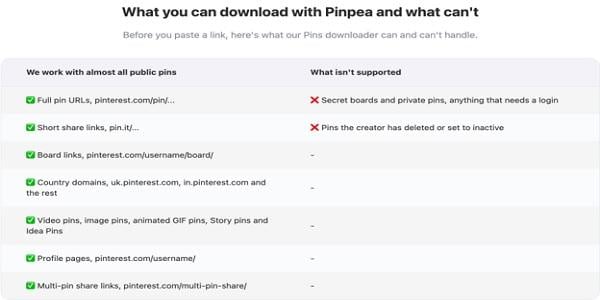
This is where the gap with the rest of the field is widest.
A pin can arrive in several formats: the full browser URL, the short pin.it link generated when sharing from the app, board addresses, and country domains such as br.pinterest.com or mx.pinterest.com. A large share of the tools in this category process only the first one.
Pinpea accepts all of them. In August 2026 it added three further formats that competitors rarely handle: profile links, links from the Answers section, and multi-pin share links. The same update fixed cover-image loading failures and processing errors on certain national domains.
Limitations of Pinpea
Pinpea does not reach secret boards, private pins or anything that requires a login, and it cannot recover pins their author has deleted. That restriction applies to every tool in the category, all of which are limited to the platform’s public content.
It does not remove watermarks. The origin of those watermarks is worth clarifying: videos uploaded directly to Pinterest carry none. When a logo appears, the file almost always came from another social network, most often TikTok, and the mark is baked into the video’s pixels. Getting the clean version means locating the original and downloading it from SSSTikTok.
That complication is specific to video. A Pinterest image download has no equivalent problem, since still pins are served without any overlay and come back at the resolution Pinterest has on file.
It does not alter file quality. Pinterest compresses material during upload, so a video shot in 1080p may end up stored at 720p. Pinpea delivers that version, which is the highest quality available on the platform.
Alternatives
PinDown. Several years in operation and reliable under load, which counts for something in a category where sites turn over quickly. It advertises downloads in 1080p, 2K and 4K, though the final resolution depends on the original file and most pins have only one version. It is funded by advertising, as its own page states, so expect ads around the download button.
PinterestDownloader. The lightest option of the group. It loads quickly even on slow connections and handles videos, images and GIFs without registration. It fails on the less common link formats: country domains and profile links return no result.
PinSaver. A recent arrival, with an interface more polished than the category average. It asks for no login and adds no marks of its own. Its short track record makes medium-term reliability impossible to judge, something the veteran sites have already answered.
ExpertsPHP. The oldest site in this comparison. The interface has not been updated since the middle of the last decade and the page carries heavy advertising, though it has kept the same domain for years and sometimes resolves old pins that other tools cannot process.
Pinpea Pinterest Downloader FAQs
Is Pinpea free, or is there a paid tier?
Pinpea is free and has no paid tier. It asks for no email address and no card details, and it does not cap downloads to push users toward signing up later.
Is Pinpea safe to use?
Yes, Pinpea is safe to use. Pinpea does not ask for a Pinterest password and does not require signing in, so account credentials never enter the process. It also involves no extension or program to install, which means it gains no permissions on the system. As for the files, its own page states that it stores nothing on its servers.
Is there an app, or does it only work in a browser?
Pinpea generally works through a browser and can be accessed on any device. You can also add it to your phone’s home screen as a shortcut, so it feels convenient like an app without requiring an installation.
If you’re an Android user and prefer using an app, you can also download the Pinpea App directly from the Pinpea website. The app is also free to use and has no download limits.
Is a browser extension a better option?
That depends on the context. An extension saves the step of copying the link, but it works only on the machine where it is installed and needs permission to read the pages visited. A web tool behaves the same on a phone, a tablet and someone else’s computer.
Why does the same link fail on other sites but work here?
Because not every tool processes the less common formats. Profile links, board links, pin.it links and national domains are the ones that most often return an error elsewhere.
In Short: Is Pinpea Worth It?
For general use, yes. Pinpea accepts every link format, handles all four content types on the platform, resolves multi-image pins in a single download and carries no advertising. None of the alternatives reviewed here meets all four conditions.
The limits are worth knowing in advance: no private or deleted content, and no tool will fix a baked-in watermark or compression applied at the source.