1. Just open https://translate.google.co.in/
2. In left side box, type the URL of your desired website (For Example icai.org)
3. Now in right side box, you will see the same URL but with the hyperlink. Now click on that hyperlink.
4. Now the new webpage will be loaded with options of languages ‘From’ and ‘To’.
5. If you know the original language of website you typed, choose it directly from drop down menu or simply choose ‘detect language’. (Sometimes “detect language” option doesn’t work properly or some webpages may have multiple languages which requires application of some advanced steps, so you may contact CA. Tejas Andharia on [email protected] in that case)
6. Now choose the desired language from “To” drop down menu in which you want to translate that website.
7. Now enjoy that website in your desired language.
Example is given below by translating https://taxguru.in/ in “Hindi” language.
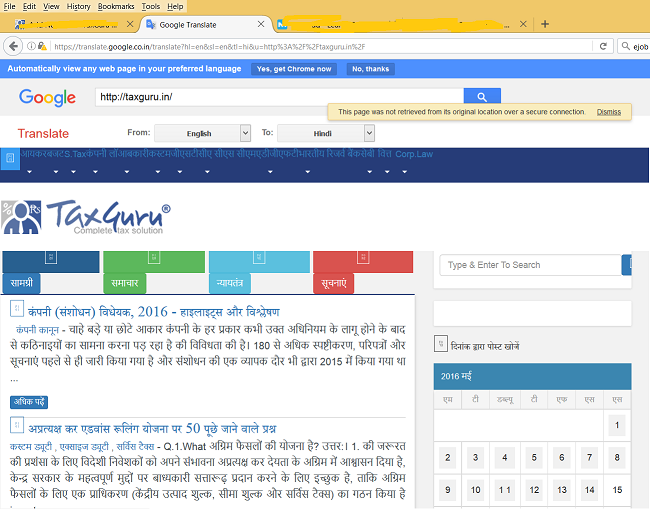
(Please note that Translation may not be 100% correct, so rely on the same at your own risk)
 CA. Tejas K. Andharia
B. COM, F.C.A., D.I.S.A.(ICAI), D.I.R.M.(ICAI)
Bhavnagar, Gujarat
Email: [email protected]