Summary: The IFSCA FAQ material explains that every IFSC unit is also an SEZ unit and must comply with the SEZ Act, 2005 and SEZ Rules, 2006, with the Administrator (IFSCA) exercising the Development Commissioner’s powers for relevant IFSC units. It sets out the Letter of Approval (LOA) process through the SWIT and SEZ Online portals, including Unit Approval Committee (UAC) consideration, deficiency rectification and issuance of LOA. The material also covers Bond-cum-Legal Undertaking (BLUT) requirements under Rule 22 and notes that Instruction No. 123 dated 23.02.2026 permits e-BLUT and removes the earlier physical stamp-paper and notarisation requirements. It explains Eligibility Certificate issuance, the six-month deadline for submitting a registered Lease Deed under Rule 18(2), procedures for changing or deleting premises, IEC requirements, sand procurement, and broadbanding or changing authorised services. The material states that units may provide only services specified in their LOA for which the relevant IFSCA licence, registration or authorisation has also been obtained.
INTERNATIONAL FINANCIAL SERVICES CENTRES AUTHORITY
SEZ Compliance FAQs Booklet
A. SEZ provisions and role of Administrator (IFSCA)
1. What is SEZ and how is it relevant for an IFSC unit?
(i) SEZ stands for Special Economic Zone. In India, SEZs have been setup in various parts of the country through the Special Economic Zones Act, 2005. SEZs are focussed primarily on export promotion and offer various tax incentives.
(ii) International Financial Services Centres Authority (IFSCA) is a statutory authority set up by an Act of Indian Parliament inter-alia to develop and regulate the financial services market in the International Financial Services Centres (IFSCs) in India.
(iii) Under Section 18 of the SEZ Act, an International Financial Services Centre (IFSC) can be setup only within a SEZ. GIFT-IFSC is the first IFSC setup in India.
(iv) By virtue of the same, every IFSC unit approved/licenced/registered/authorized by IFSCA under the IFSCA Act is an SEZ unit also and has to comply with the provisions of the SEZ Act/Rules also.
2. Why is it necessary to get the SEZ approval for an IFSC unit?
A unit in IFSC has to be a unit under the SEZ Act also and hence it is mandatory for every entity intending to setup a unit in IFSC, to obtain the Letter of Approval (LOA) under the SEZ Act, before obtaining the IFSCA approval.
3. What is the role of Administrator (IFSCA)?
Every SEZ is administered by a Development Commissioner under the SEZ Act who is overall in charge of the Special Economic Zone and exercises administrative control and supervision over the Zone. In order to provide a unified regulatory framework for IFSC units, the powers of the Development Commissioner for IFSC units have been vested with an officer of IFSCA designated as ‘Administrator (IFSCA)’ vide Section 12 (7) of the SEZ Act.
4. What are the compliances required to be done by an IFSC unit under the SEZ Act/Rules? The following chart depicts the life cycle of a SEZ unit and different requirements to be complied with by it at different stages of its life cycle:
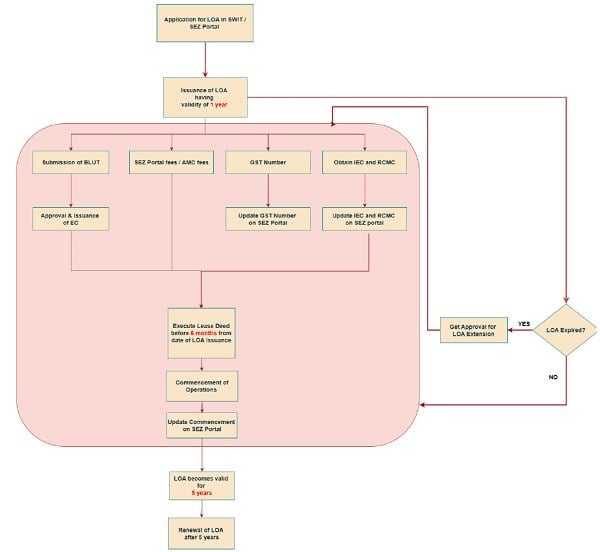
Figure 1 – SEZ Process Workflow
B. Issuance of Letter of Approval
5. What is the Letter of Approval (LOA) under the SEZ Act/Rules?
The Letter of Approval (LOA) is issued under Rule 19 of SEZ Rules, 2006 to every unit for a specific set of operations authorized to be performed by it in the SEZ. The unit must provide only the services specified in the Authorized Operations and nothing beyond them.
6. What is the procedure to apply for LOA under SEZ Act?
IFSCA has launched the SWIT portal through which the applicants can submit their application for obtaining IFSCA Regulatory approval. In the SWIT portal, the applicant units are required to file a Common Application Form (CAF) for obtaining IFSCA Regulatory approval. Section-D of the CAF pertains to the application for obtaining the SEZ LOA. Once the CAF is submitted and signed using Digital Signature, the application for SEZ LOA is submitted automatically on the SEZ Online portal. Further processing of the application for LOA approval is done in the SEZ Online portal only and not in the SWIT portal.
7. Can the application for LOA be submitted in the SEZ Online portal directly instead of the SWIT portal?
For all the activities for which application filing is enabled through SWIT portal by IFSCA, the SEZ LOA application must be filed only through the SWIT portal. Public Notice dated 04.10.2024 issued in this regard may be found here. The application for Foreign Universities and Bullion Trading is not yet enabled in the SWIT portal. The application for LOA for such activities is required to be filed in the SEZ Online portal directly in Form-FA.
8. What are the activities for which the application for LOA has to be submitted in the SEZ Online portal directly?
The application for Foreign Universities and Bullion Trading is not yet enabled in the SWIT portal. However, the SWIT portal provides for a Miscellaneous application form which may be used by these entities to submit their IFSCA Regulatory application.
For these two types of activities, the SEZ LOA application is required to be filed in the SEZ Online portal directly in Form-FA. The applicants who file the application for SEZ LOA directly in the SEZ Online portal must ensure that their application for the IFSCA Regulatory approval is also filed simultaneously through the Miscellaneous application filed in the SWIT portal. It may be noted that the application for SEZ LOA filed in the SEZ Online portal is processed only after the corresponding IFSCA Regulatory application is also filed.
9. What are the documents to be submitted along with the application for LOA?
Public Notice No. 02/2024-25 dated 05.11.2024 issued by the office of Administrator (IFSCA) in this regard may be found here.
10. What is the step-by-step process for approval of the LOA application?
(i) For the activities for whom the application filing is enabled in SWIT, the application so filed under SWIT gets forwarded automatically to the IFSCA’s regulatory team for regulatory approval, and also to the office of Administrator (IFSCA) through SEZ Online portal, for processing for issuance of LOA.
(ii) For the activities for whom the application filing is not enabled in SWIT, the application for LOA needs to be filed directly in the SEZ Online portal. On receipt of such application in the SEZ Online portal, confirmation from IFSCA regulatory team is sought about filing of the Regulatory application before proceeding further in the matter.
(iii) After receipt of the LOA applications in the SEZ Online portal, through either of the above modes [(i) or (ii)], the same are examined by the office of Administrator (IFSCA) and any deficiencies/queries are raised in the SEZ Online portal itself. The applicant must login to the SEZ Online portal and make the necessary rectifications against the deficiencies so that the application becomes complete.
(iv) The applications that are complete in all respects are then placed before the Unit Approval Committee (UAC) for consideration, by including the application in the Agenda for the UAC meeting. Once the application is approved by the UAC, the same is recorded in the Minutes of the Meeting. Once the Minutes of the Meeting are finalized and approved, the LOA is issued in the SEZ Online portal itself.
11. What is the frequency and mode of the UAC meeting?
The UAC normally meets once every week. The meetings are conducted in hybrid mode – in person and through VC. The date of the meeting for each week along with the deadline for submission of applications for that UAC is informed by way of a Meeting Notice issued in the previous week. The Meeting Notices can be found here.
12. After submitting the application for LOA, how will the applicant know if their application has been taken up in the UAC meeting?
After examination of the LOA applications received in SEZ Online portal, the same are examined by the office of Administrator (IFSCA) and any deficiencies/queries is raised in the SEZ Online portal itself. The applicant must login to the SEZ Online portal and make the necessary rectifications against the deficiencies, so that the application becomes complete. The Agenda for each UAC meeting is published on the IFSCA website one (or) two days before the UAC. The Agenda of the UAC meetings can be found here. The office of Administrator (IFSCA) also sends email to the applicants who are included in the Agenda. This email generally includes a copy of the Agenda and the Meeting link to join the meeting via Video Conference. The applicants are expected to send the return email communicating the name(s) of their authorized representatives to attend the UAC meeting, along with Authorisation letters/Board Resolutions in their favour.
13. Is it mandatory for the applicant to appear physically before the UAC?
The UAC meetings are conducted in hybrid mode and the authorized representatives of the applicant may attend via Video Conference (or) in person, as per their convenience, unless specifically advised to attend in a particular mode.
14. Who can appear before the UAC from the applicant side?
The person representing the applicant in the UAC meeting is required to submit a valid Board Resolution/Authority Letter from the Board of Directors/Partners authorizing him/her to appear before the UAC, along with identification documents. The said authorization and ID shall be submitted to the office of Administrator (IFSCA) via email before the UAC. The authorized representatives are expected to be well- versed about the proposal and be prepared to discuss both short-term and long-term plans of the applicant.
15. What happens if the applicant has missed the deadline for submitting the application for LOA?
If the deadline for submitting the application for LOA for a particular UAC meeting is missed, all applications, if complete, are taken up in the next UAC meeting.
16. What happens if the applicant missed the deadline for UAC because they encountered technical errors/glitches while submitting the application?
Exceptions may be considered only in rare cases of genuine glitches/malfunctions which are exclusively attributable to the SWIT portal (or) the SEZ Online portal, and the applicant is able to demonstrate that there is a case where the application needs to be taken up urgently and it cannot wait till next UAC. Any mistakes/misunderstandings/oversight by the applicant shall not be considered as technical errors/glitches.
17. What is expected from the applicant during the proceedings of the UAC meeting?
(i) During the meeting, the applicant is expected to give a brief of their project proposal and answer the questions, if any, asked by the UAC. UAC informs the applicant whether the proposal is approved (or) not.
(ii) The Minutes of the Meeting, detailing the decisions taken on each application are published on the IFSCA website, normally within a week’s time. The Minutes of the UAC Meetings can be found here.
18. Once the application is approved in the UAC meeting, what are the next steps for the applicant to obtain the LOA?
Once the application is approved by the UAC, the decision is recorded in the Minutes of the Meeting. Once the Minutes of the Meeting are finalized and approved, the LOA is issued in the SEZ Online portal itself.
19. Is there any deadline for replying to deficiencies raised in the SEZ Online portal?
It is the responsibility of the applicant to proactively and properly respond to and rectify the deficiencies raised in the SEZ Online portal without any inordinate delay. The application is placed before the UAC for consideration only after all the deficiencies are rectified in the SEZ Online portal. Hence, it is in the interest of the applicant that the deficiencies are rectified swiftly so that the application may be included in the Agenda for the UAC.
20. What are the guidelines to avoid some common deficiencies/errors/mistakes committed by the Units while submitting the LOA application through the SWIT portal?
The guidelines to avoid some common deficiencies/errors/mistakes are as follows.
(i) Applicant shall enter the complete Registered address in the respective field in the application. If the Registered address is in GIFT-IFSC, then the address entered in the LOA application shall match the address mentioned in the PLOA.
(ii) If the applicant is setup in IFSC as a Branch office, then the applicant shall mention ‘Branch’ in the Section named ‘Constitution of Applicant Firm’.
(iii) Applicant shall be very specific about the Licence they are applying for under the relevant IFSCA Regulations/Framework in the Section named ‘Area Of Business Proposed To Be Undertaken As Per IFSCA Regulations’, instead of being very vague and ambiguous. Some examples in this regard are
a. “To act as a FME (Non-Retail) under the IFSCA Fund Management Regulations, 2025” instead of mentioning “Fund management activities”
b. “To undertake Ancillary activities under the IFSCA TechFin and Ancillary Services Regulations 2025” instead of mentioning “Consulting services”
c. “To undertake Ship leasing under the IFSCA Finance Company Regulations 2021 read with IFSCA Framework for Ship Leasing.” instead of mentioning “To provide ships on lease to clients in India and outside India”
(iv) Under the Section named ‘Infrastructure Requirement’, it may be ensured that the Requirement of land/Office Space is mentioned in sq. mtrs. and not in any other unit like sq.ft etc.
(v) Under the Section named ‘Employment’, it may be ensured that the number of employees projected is not less than the minimum number of employment mandated, if any, under the relevant IFSCA Regulation/Framework.
(vi) Applicant shall submit the copy of Board Resolution which authorizes, by name (or) designation, the person submitting the application to make such application under the SEZ provisions for obtaining LOA to setup the IFSC unit.
21. When the application for LOA is made in the SWIT portal and not on the SEZ Online portal, how will the applicant be able to login to the SEZ Online portal?
Once the Common Application Form (CAF) is submitted and DSC-signed in the SWIT portal, the applicant automatically receives the login credentials for the SEZ Online portal in their email address given in the SWIT portal. The applicant shall use these credentials to login to the SEZ Online portal and rectify any deficiencies/queries raised in the SEZ Online portal.
22. What should the applicant do if they have not received the login credentials for the SEZ Online portal?
In case the applicant has not received the login credentials, they may contact NSDL using the details available here (or) write to [email protected]. The applicant may also contact SWIT Helpdesk by writing to [email protected].
23. How will the applicant know if the deficiency has been raised in the SEZ Online portal?
The deficiency/query is raised in the SEZ Online portal generally within 1-2 working days after submission of application in the SWIT/SEZ Online portal. The applicant must login to the SEZ Online portal, access the application request from the Inbox and find out about the deficiencies/queries from the Remarks History link of the application.
24. Can the applicant respond to the deficiencies by email/SWIT portal instead of the SEZ Online portal?
No, the deficiencies must be rectified in the SEZ Online portal only.
25. How will the applicant know if the LOA has been issued for them?
The applicant must login to the SEZ Online portal, access the application request from the Inbox and download the LOA, once the LOA is issued in the SEZ Online portal. The LOA can be downloaded from the SEZ Online portal upon payment of the applicable SEZ Online portal AMC/maintenance fees.
26. What are the steps to be taken by the applicant after issuance of LOA in order to download the LOA in the SEZ Online portal?
The applicant must pay Annual Maintenance fees in the SEZ Online portal for downloading the LOA and further accessing the SEZ Online portal for post-LOA SEZ compliances. The SEZ Online portal is developed and maintained by NSDL and the said fees are paid to them. IFSCA does not have any role in the said fees and they are not part of SWIT/IFSCA fees structures. If the unit requires any clarification/assistance regarding payment of Annual Maintenance fees in the SEZ Online portal, they may contact NSDL/NDML using the details available here (or) write to [email protected]/ [email protected].
C. BOND-CUM-LEGAL UNDERTAKING (BLUT)
27. What is the meaning of Bond-cum-Legal Undertaking (BLUT) in the SEZ Act/Rules?
As per Rule 22 of SEZ Rules, the BLUT is required to be executed by a SEZ unit with regard to its obligations and compliances under the SEZ Act/Rules. Once executed, the BLUT is required to be approved jointly by the Specified Officer of Customs and the Administrator (IFSCA).
28. What is the format of the BLUT?
The BLUT is required to be executed in Form-H which is provided in SEZ Rules. The format is attached herein as Annexure-A.
29. How should the BLUT be executed?
As per Instruction No. 123 dated 23.02.2026 issued by the Ministry of Commerce, the BLUT may be executed as an e-BLUT, including through e-stamp (or) other digital mechanism. The earlier Instruction No. 02 dated 24.03.2006 has been superseded with Instruction No. 123 and the requirement to execute BLUT in physical form on non-judicial stamp paper notarized by a Notary Public have been done away with. The documentary requirements while executing BLUT in the format of Form-H are as follows.
a) Name and SEZ address of the unit shall be mentioned properly in the BLUT without any mistake/typo errors.
b) Letter submitted by the unit accepting the LOA
c) Bond Value Calculation Sheet d) Board Resolution authorizing the Obligor to execute and submit the BLUT
e) Signature of Obligor on the BLUT; DSC signature is also permitted.
f) KYC documents (Aadhar/PAN card) of the Obligor attached to the BLUT
30. What are the key points to remember while executing the BLUT?
Public Notice No. 02/2024-25 dated 05.11.2024 issued by the office of Administrator (IFSCA) in this regard based on Instruction No. 2 dated 24.03.2006 may be found here. In light of Instruction No. 123 dated 23.02.2026 issued by the Ministry of Commerce, the key points to note are as follows:
a) The BLUT shall be in the proper format, as specified in Form-H of SEZ Rules, 2006 along with Instruction No. 123 dated 23.02.2026 issued by Department of Commerce.
b) Letter from the entity accepting the terms and conditions of the LOA may be attached with the BLUT.
c) Proper calculation sheet showing the amount for which BLUT is submitted shall be attached and the same shall be signed by the obligor. Care may be taken to ensure that the amount for which the BLUT is submitted is not less than the amount shown in the calculation sheet.
d) Proper resolution authorizing the Obligor to sign the BLUT under SEZ Act and Rules. e) Name and address of the Obligor are properly mentioned in the BLUT along with a proper ID proof attached.
31. Can the BLUT be signed digitally?
Yes, the BLUT may be signed by Digital Signature.
32. What is the meaning of Bond Value calculation sheet?
The Bond Value calculation sheet enumerates the total Customs duties and GST that the SEZ unit projects to save in the next 05 financial years. The amount for which the BLUT is executed must not be less than the amount shown in the calculation sheet. The calculation sheet has to be in the letterhead of the applicant Unit and be signed by the Obligor with proper seal and stamp.
33. What is the process of approval of the BLUT?
Public Notice No. 06/2026-27 dated 12.08.2026 issued by the office of Administrator (IFSCA) in this regard based on Instruction No. 123 dated 23.02.2026 may be found here. The BLUT is approved in the SEZ Online portal through a ‘New LUT’ request. The Unit must file ‘New LUT’ request in the SEZ Online portal with complete and properly signed PDF copy of the BLUT executed by the Unit. While submitting the ‘New LUT’ request, the unit must ensure that the details of Bond amount, Obligor, etc. as recorded in the approved BLUT are mentioned properly without any mistakes. Once the ‘New LUT’ request is filed, the same is approved by Specified Officer and Administrator (IFSCA) in the SEZ Online portal. Once approved, the Bond amount along with LUT validity dates will be automatically updated for the unit in the SEZ Online portal.
34. What should the unit do if the unit wishes to top-up/increase the Bond amount?
The unit must submit another fresh BLUT, as explained above, in the SEZ Online portal by filing an ‘Update LUT’ request.
35. After submitting the ‘New LUT’/‘Update LUT’ request in the SEZ Online portal, how will the unit know if the same is approved?
Once the unit has applied in the SEZ Online portal, any deficiencies/queries is raised in the SEZ Online portal itself. The unit must login to the SEZ Online portal, access the ‘New LUT’/’Update LUT’ request from the Inbox and find out about the deficiencies/discrepancies from the Remarks History link of the request. Once the ‘New LUT’/’Update LUT’ request is approved in the portal, the Bond amount along with LUT validity dates are automatically updated for the unit in the SEZ Online portal.
36. Before issuance of Instruction No. 123 dated 23.02.2026 by Ministry of Commerce and Industries, the BLUT was submitted in physical form to the office of Administrator (IFSCA) for approval. Is the BLUT still required to be submitted in physical form?
No, the BLUT is not required to be submitted in physical form for approval. As per Instruction No. 123 dated 23.02.2026 issued by the Ministry of Commerce, the
BLUT may be executed as an e-BLUT, including through e-stamp (or) other digital mechanism. The earlier Instruction No. 02 dated 24.03.2006 has been superseded with Instruction No. 123 and the requirement to execute BLUT in physical form on non- judicial stamp paper notarized by a Notary Public have been done away with.
37. If the unit does not have access to the SEZ Online portal, how should the ‘New LUT’/’Update LUT’ request be submitted?
If the unit does not have access to the SEZ Online portal, they may retrieve access to the portal by contacting NSDL/NDML using the details available here (or) write to [email protected]/[email protected].
D. Eligibility Certificate
38. What is the Eligibility Certificate (EC) and why is it required?
Under the Gujarat SEZ Act/Rules, the Eligibility Certificate issued by the Administrator (IFSCA) is necessary to claim State tax exemptions such as stamp duty.
39. How should the unit apply for getting the EC issued in their name?
Once the BLUT, submitted through a ‘New LUT’ request is approved by both the Specified Officer and the Administrator (IFSCA) in the SEZ Online portal, the Eligibility Certificate is sent to the Unit by email. There is no requirement to make any separate application for the EC.
E. Lease Deed
40. What is the deadline for execution of Lease Deed for a unit under the SEZ Act/Rules?
As per Rule 18 (2) of SEZ Rules, a copy of the registered Lease Deed is required to be furnished to the Administrator (IFSCA) within six months from the issuance of LOA.
41. What will happen if the unit fails to submit the registered Lease Deed within six months from the issuance of the LOA?
(i) As per Rule 18 (2) of SEZ Rules, if a unit fails to submit the registered Lease Deed within six months from the issuance of LOA, the Unit Approval Committee may take action to withdraw the LOA after giving an opportunity of being heard.
(ii) If the unit is not able to register the Lease Deed within six months from the issuance of LOA, the unit is required to send an email to ifsca- [email protected] requesting the UAC to condone the delay and seek an extension of the deadline to submit the Lease Deed. The request is examined by the office of Administrator (IFSCA) and placed before the UAC for its consideration, by including the application in the Agenda for the UAC meeting. The unit has to appear before the UAC and explain the reasons for the delay.
(iii) After hearing the unit’s case, the UAC may grant an extension for registering and submitting the lease deed. If the UAC is not satisfied with the reasons given for the delay, the UAC may decide to withdraw the LOA, which effectively ceases the existence of the unit in the SEZ and IFSC.
42. What are the documents required for execution of the Lease Deed?
While executing the Lease Deed, it is necessary for the unit to have the following documents:
a) Valid LOA – As per Rule 18(2), the Co-Developer/Developer shall enter into a lease agreement with the unit only after the issuance of LOA by the Administrator (IFSCA).
b) Eligibility Certificate – Under Gujarat SEZ Act/Rules, the Eligibility Certificate issued by the Administrator (IFSCA) is necessary to claim State tax exemptions such as stamp duty. The EC will be issued to the unit along with approved copy of the BLUT.
43. Can the Lease Deed be executed for any number of years?
As per Rule 11(5) of the SEZ Rules, the lease deed period shall not be less than 5 years. However, there is no upper limit prescribed for the period of the Lease Deed.
44. A Fund Management Entity (FME) has obtained LOA for the Funds launched by them. The LOAs of these Funds are obtained in the same premises as that of the FME. Is it required to execute separate Lease Deed for the Funds?
Yes, the FME shall execute the main Lease Deed in its name and supplemental Lease Deed is required to be executed in the name of the Funds for the same premises.
45. Does the 06-months deadline apply for the supplemental Lease Deed to be executed by the Funds?
Yes, each Fund has a separate LOA, and under the aegis of the SEZ Act and Rules, each Fund is a separate Unit. Hence the deadline of 06 months is applicable for Funds also, just like every other SEZ unit. In case the Fund has not executed its Lease Deed within 06 months, but the FME has executed its Lease Deed (or) the FME has obtained extension of time in the UAC meeting for submission of Lease Deed, then, on submission of an email request, the UAC will grant extension by approval through Circular instead of calling the FME to the UAC to explain the reasons for delay.
46. How can the unit register the Lease Deed if the LOA has expired?
If the LOA is found to have expired at the time of registering the Lease Deed, the unit must obtain LOA Extension by applying on the SEZ Online portal. Registering the Lease Deed on an invalid/expired LOA is a violation of Rule 18(2) of SEZ Rules and may attract monetary penalties.
47. How should the Lease Deed be submitted to the office of Administrator (IFSCA)?
The unit must submit a ‘Unit Lease Deed’ request in the SEZ Online portal and upload copy of the registered Lease Deed in the said request. In case, the Lease Deed cannot be uploaded due to size constraints, then the unit shall email a copy of the registered Lease Deed to [email protected] after filing the ‘Unit Lease Deed’ request. The unit must ensure that the term of the Lease Deed and address of the unit are properly mentioned in the ‘Unit Lease Deed’ request submitted in the SEZ Online portal.
48. If the unit does not have access to the SEZ Online portal, how should the Unit Lease Deed request be submitted?
If the unit does not have access to the SEZ Online portal, they may retrieve access to the portal by contacting NSDL/NDML using the details available here (or) write to [email protected] /[email protected] .
F. Change of Address/Addition of premises/Deletion of premises
49. If a unit wishes to shift their premises to a different address (or) expand their office by including a new premises in their address, can the unit proceed to do the same immediately?
No, the LOA is issued to a unit on a specific address based on the Provisional Letter of Allotment issued by a Developer/Co-Developer. In case the unit wishes to change their premises (or) add a new premises to their address, the unit has to obtain
prior approval of the Administrator (IFSCA). As per condition 13 of Form-H, the unit shall not change the location of the premises except with the written permission of the Administrator (IFSCA). Operating from a premises not approved in the LOA of the unit is a violation of SEZ Act/Rules and may attract monetary penalties (or) cancellation of LOA.
50. What are the steps to be followed by the unit for the change of address to another premises from their existing premises?
The Unit is required to submit a request for the change of address on the SEZ Online portal under ‘Free Form – Change of Area (Addition)’ and attach a copy of the Provisional Letter of Allotment (PLOA) issued by the Developer (or) Co-Developer for the new premises to which they intend to shift. In the Free Form request, the unit must clearly mention if the request is for change of premises (or) addition of a new premises.
51. What are the steps to be followed by the unit for the addition of address of another premises to their existing address?
The Unit is required to submit a request for the addition of address on the SEZ Online portal under ‘Free Form – Change of Area (Addition)’ and attach a copy of the Provisional Letter of Allotment (PLOA) issued by the Developer (or) Co-Developer for the new premises to be added to their address. In the Free Form request, the unit must clearly mention if the request is for change of premises (or) addition of a new premises.
52. After applying for change/addition of address in the SEZ Online portal, how will the unit know if the application is complete?
(i) Once the unit has applied in the SEZ Online portal, any deficiencies/queries are raised in the SEZ Online portal itself. The unit may login to the SEZ Online portal, access the ‘Free Form – Change of Area (Addition)’ request from the Inbox and find out about the deficiencies/discrepancies, if any, raised by the office of Administrator (IFSCA) from the Remarks History link of the request.
(ii) Once the ‘Free Form – Change of Area (Addition)’ request is approved in the portal, the address details will be updated in the portal and a letter for approval of change/addition of address will be issued in the SEZ Online portal. The applicant unit may download the letter from the portal from the SEZ Online ID of the ‘Free Form – Change of Area (Addition)’ request. After approval in the SEZ Online portal, a fresh Eligibility Certificate incorporating the changed/additional premises in the address is issued to the unit by email separately.
53. What are the conditions to be followed by the unit after the change/addition of address is approved in the SEZ Online portal?
The approval for change/addition of address is subject to the following conditions – a) The unit has to submit a copy of the registered Lease Deed for the new changed premises/added premises as required under Rule 18 (2) of SEZ Rules, 2006.
b) In case of change of address, if the unit has registered a Lease Deed in the old address, then the same has to be cancelled and a copy of the cancelled Lease Deed is required to be submitted to the office of Administrator (IFSCA).
c) The BLUT executed in the previous address, along with all its terms and conditions, shall be applicable and binding on the unit in the new changed address also. In case BLUT has not been executed by the unit in the previous address, then the unit has to execute a fresh BLUT for the new changed address and submit the same to the office of Administrator (IFSCA) for processing/approval.
54. What are the steps to be followed by the unit for the deletion of address of a premises from their existing address?
The Unit is required to submit a request for the deletion of address on the SEZ Online portal under ‘Free Form – Change of Area (Deletion)’. In the Free Form request, the unit must clearly mention the premises that they wish to delete from their address. The unit must not apply for deletion of a premises which is the sole premises held by them as that would make the LOA untenable under law.
55. After applying for deletion of address in the SEZ Online portal, how will the unit know if the application is complete?
Once the unit has applied in the SEZ Online portal, any deficiencies/queries will be raised in the SEZ Online portal itself. The unit may login to the SEZ Online portal, access the ‘Free Form – Change of Area (Deletion)’ request from the Inbox and find out about the deficiencies/discrepancies raised, if any, from the Remarks History link of the request. Once the ‘Free Form – Change of Area (Deletion)’ request is approved in the portal, the address details will be updated in the portal and a letter for approval of deletion of address will be issued in the SEZ Online portal. The applicant unit may then download the letter from the portal from the SEZ Online ID of the ‘Free Form – Change of Area (Deletion)’ request.
56. What are the steps to be followed by the unit after the deletion of address is approved in the SEZ Online portal?
After the approval for deletion of address, the unit is required to take the following actions –
a) If the unit has registered Lease Deed for the deleted premises, the unit is required to submit copy of cancelled Lease deed for the same within 30 days of approval in the SEZ Online portal.
b) The unit shall immediately vacate the deleted premises and, in any case, shall not continue to occupy the deleted premises beyond 30 days of approval of the deletion request.
G. Importer-Exporter Code (IEC)
57. What is the Importer-Exporter Code (IEC)?
An Importer-Exporter Code (IEC) is a unique business identification number issued by the Directorate General of Foreign Trade (DGFT). IEC is mandatory for every entity involved in import (or) export activities from India.
58. How can a unit obtain IEC code?
To apply for an IEC, the Unit can directly visit the DGFT website by clicking the following link: https://www.dgft.gov.in/CP/?opt=iec-profile-management
59. Is an IEC code required for GIFT-IFSC units?
Yes. Since the IFSC has been setup within the SEZ area, all the GIFT-IFSC units must apply to DGFT and obtain an IEC.
60. What are the steps to update the IEC in the SEZ Online portal?
Once the IEC is issued by DGFT, the unit is required to file a ‘Free Form – IEC Application’ request in the SEZ Online portal and attach therewith the pdf copy of IEC Certificate. On approval of the Free Form request, the IEC gets automatically updated in the unit’s profile data in the SEZ Online portal.
H. Procurement of Sand
61. What is the process for procurement of sand to GIFT IFSC for interior construction by the Unit?
Any unit willing to procure sand for interior construction purposes within the GIFT-IFSC, is required to submit a ‘Free Form-Others’ request in the SEZ Online portal and upload a cover letter stating the requirement for sand for interior construction along with the quantity of sand required. Once the ‘Free Form-Others’ request is approved in the portal, a letter for approval of procurement of sand is issued in the SEZ Online portal. The applicant unit may download the letter from the portal from the SEZ Online ID of the ‘Free Form-Others’ request filed by them.
I. Broadbanding/Change of services
62. If a unit wishes to obtain IFSCA approval for additional services, other than those authorized in the LOA, what are the SEZ compliances required to be followed by the unit?
If the unit wishes to diversify (i.e.) add more services to their LOA (or) change the services they provide, it is called Broadbanding of services. For example, a unit may have LOA for Aircraft Leasing services and may wish to provide Ship Leasing services also. On another instance, a unit may have LOA for FME (Non-Retail) and may want to become a FME (Retail). In both these cases, the unit has to get the Authorized Operations in their LOA amended, which is, as stated above, also referred to as Broadbanding. The unit must get the Authorized Operations in their LOA amended before obtaining the IFSCA Regulatory approval for such new/changed services.
63. What is the procedure to apply for amendment/Broadbanding of the Authorized Operations in the LOA?
(i) If the unit wishes to obtain IFSCA approval for new/additional services, the corresponding Regulatory application must be filed in the SWIT portal.
(ii) The unit is also required to submit a ‘Free Form-Broadbanding/Capacity Enhancement’ request in the SEZ Online portal and upload proof of submission of Regulatory application in SWIT portal immediately after submitting their application in SWIT portal for the new/additional services. In the ‘Item Details’ tab of the said Free Form request, the unit must mention the amended set of services that will be provided by them, in the section named ‘Proposed for Renewed period’.
(iii) Broadbanding applications sent over physical/email mode are not entertained for processing/approval.
(iv) The office of Administrator (IFSCA) has issued Public Notice No. 04/2025- 26 dated 29.10.2025 in this regard which may be found here.
64. What is procedure for approval of amendment/Broadbanding of Authorized Operations in the LOA?
(i) Every application is examined by the office of Administrator (IFSCA) and placed before the UAC for consideration, by including the application in the
Agenda for the UAC meeting. The unit is not required to appear before the UAC.
(ii) Once the request is approved by the UAC, the approval is reflected in the Minutes of the UAC Meeting. Then, the ‘Free Form-Broadbanding/Capacity Enhancement’ request is approved on the SEZ Online portal, and the revised LOA with the additional Authorized Operations is generated in the SEZ Online portal itself. The revised LOA may be downloaded from the SEZ Online ID of the ‘Free Form-Broadbanding/Capacity Enhancement’ request.
65. After applying for amendment/Broadbanding of LOA Authorized Operations in the SEZ Online portal, how will the unit know if the application is complete?
Once the unit has applied in the SEZ Online portal, any deficiencies/queries will be raised in the SEZ Online portal itself. The unit must login to the SEZ Online portal, access the ‘Free Form-Broadbanding/Capacity Enhancement’ request from the Inbox and find out about the deficiencies/discrepancies if any raised, from the Remarks History link of the request. Once the ‘Free Form-Broadbanding/Capacity Enhancement’ request is approved in the portal, the revised LOA is generated in the SEZ Online portal itself. The revised LOA may be downloaded from the SEZ Online ID of the ‘Free Form- Broadbanding/Capacity Enhancement’ request.
66. What services can be provided by a Unit in the IFSC? Can a Unit provide other services also which are not mentioned in the LOA?
The Unit in the IFSC can provide only those services which are mentioned in the LOA for which Licence/Registration under relevant IFSCA Regulations/Framework has also been obtained by the Unit.
For any new/additional services, the Unit must obtain approval for Broadbanding of services from the office of Administrator (IFSCA) and get their LOA updated before obtaining IFSCA Licence/Certificate of Registration for such new/additional services.
67. The Unit was issued an LOA for certain services as Authorized Operations. However, the Unit obtained approvals under various IFSCA Regulations/Frameworks for performing activities other than those included in the Authorized Operations in their LOA. Can the Unit apply for amendment/Broadbanding of LOA Authorized Operations now?
Yes, the Unit must immediately apply for amendment/Broadbanding of LOA Authorized Operations before carrying out any further operations on the activities not included in the LOA. The office of Administrator (IFSCA) has issued Public Notice No. 05/2025-26 dated 29.10.2025 in this regard which may be found here.
68. Should the unit submit the amendment/Broadbanding request in physical/email mode also?
The Broadbanding of services request is required to be submitted only in the SEZ Online portal and there is no need to submit the application through physical/email mode also.
69. If the unit does not have access to the SEZ Online portal, how should the amendment/Broadbanding application be submitted?
If the unit does not have access to the SEZ Online portal, they may retrieve access to the portal by contacting NSDL/NDML using the details available here (or) write to [email protected]/[email protected]. The office of Administrator (IFSCA) accepts applications only through the SEZ Online portal and not in physical/email mode.
J. LOA Extension
70. What is the validity of the Letter of Approval (LOA) issued under the SEZ Act?
As per Rule 19(4) of SEZ Rules, the Letter of Approval (LOA) remains valid for one year from the date of original issuance, within which the Unit must commence their business operations.
71. What happens to the LOA if the unit has not commenced business operations within one year?
In case the Unit is unable to commence business operations before the expiry of its LOA, it is required to make a request for the extension of LOA to the Administrator (IFSCA). The Administrator (IFSCA) may grant an extension of validity of LOA for valid reasons to be recorded in writing. As per Rule 19 (4), the Extension can be granted for a further period of two years after the expiry of the original LOA.
72. How should a unit apply for LOA Extension?
Unit must submit an ‘LOA Extension’ request on the SEZ Online portal only, with the following supporting documents merged in a single pdf.
a) Cover letter detailing the reasons why the Unit was unable to commence operations before the expiration of the LOA and the steps taken so far to commence operations.
b) Copy of the IFSCA Letter of Authorisation (or) Certificate of Registration/Recognition (or) approval in any other form under the relevant IFSCA Regulation.
c) Copy of the registered Lease Deed.
Unit must submit the ‘LOA Extension’ request on the SEZ Online portal with all these documents, at least one month before the expiry of their LOA.
LOA Extension applications sent over physical/email mode are not entertained for processing/approval.
73. What if the unit has not registered the Lease Deed at the time of applying for an LOA Extension?
In the cover letter submitted along with the ‘LOA Extension’ request, the unit must explain the reasons in detail as to why they were unable to register the Lease Deed and request for condonation of delay in executing the Lease Deed. The request for condonation of delay is taken up in the Unit Approval Committee (UAC), as per Rule 18 (2) of SEZ Rules. The ‘LOA Extension’ request is processed only after the UAC decides whether the delay in submitting the registered Lease Deed is condoned (or) otherwise.
74. What if the LOA of the unit has already expired? Can the unit still obtain an LOA Extension?
It is strongly advised that the Unit must submit the LOA Extension request on the portal with all the documents, at least one month before the expiry of the same. However, the unit can apply in the SEZ Online portal for LOA Extension even after expiry of LOA. In such cases, the unit must clearly mention in their cover letter the reasons for delay in filing the LOA Extension request. Further, if the LOA expires and the unit does not take any steps to extend it, monetary penalties may follow.
75. What are the consequences of expiry of LOA?
(i) As per Rule 19 (5) of SEZ Rules, if the Unit has not commenced business within the validity period (or) the extended validity period of the LOA, then the LOA shall be deemed to have been lapsed with effect from the date on which its validity expired. This means that the entity is not an SEZ unit anymore once the LOA has expired.
(ii) Under Rule 11 (5) of SEZ Rules, the validity of the Lease Deed and the lease rights to the premises shall cease to exist upon the expiry of the LOA.
(iii) Further, one of the necessary pre-conditions for an IFSC unit is to be an SEZ unit with a valid LOA. An entity without a valid SEZ LOA cannot do any business, raise invoices, receive moneys, etc. in an SEZ, which will directly impact their IFSC operations. Further, if the LOA expires and the unit does not take any steps to extend it, monetary penalties may follow.
76. What happens if the unit has not been able to commence operations even after obtaining LOA Extension for two years from the Administrator (IFSCA)?
(i) Beyond two years after the expiry of the original LOA, further extension of one year may be granted by the Administrator (IFSCA) in case the Administrator (IFSCA) is satisfied that two-thirds of activities for setting up the business has been completed by the unit, as per second proviso to Rule 19 (4) of SEZ Rules. These activities include the compliances under SEZ Act such as executing Lease Deed, etc. and also the milestones towards the IFSC operations such as securing capital, infusing capital, executing Contribution agreements, executing Lease agreements for aircrafts/vessels, appointment of PO/CO etc. as the case maybe.
(ii) In case the unit has not shown completion of various activities for setting up the business, then, as per third proviso to Rule 19 (4) of SEZ Rules, the power to grant further extension of LOA rests with the Board of Approval (BoA) setup by the Ministry of Commerce, GoI. The Board of Approval may, upon being satisfied, grant further extension for a further period not exceeding one year, at a time.
77. What is the procedure for obtaining LOA Extension beyond two years from the expiry of original LOA?
Public Notice No. 01/2026-27 dated 18.05.2026 issued in this regard may be found here. The unit must submit an ‘LOA Extension’ request on the SEZ Online portal, at least 03 months before expiry of the LOA, with the following supporting documents merged in a single pdf.
a) Cover Letter: The cover letter shall highlight the initiatives taken by the unit to commence business operations, including detailed reasons as to why the unit was unable to commence the operations so far. The Cover letter shall highlight the steps taken by the Unit to commence business operations.
b) Present Progress: The status of progress achieved by the unit on both SEZ compliances and IFSC operations. The format of Present Progress status to be submitted is attached herein as Annexure-F. c) Lease Deed: Copy of registered Lease Deed d) IFSCA Approval: Copy of the IFSCA Letter of Authorisation (or) Certificate of Registration/Recognition (or) approval in any other form e) Additional Documents: Any other documents to highlight the steps taken by the Unit to commence business operations such as NOCs, Agreements, invoices, bank statements, etc.
Such requests for extension of LOA beyond two years after the expiry of original LOA are examined by the office of Administrator (IFSCA) and forwarded to the Board of Approval for consideration.
78. What are the details to be mentioned in the Present Progress status to be submitted by the Unit?
The format of Present Progress status to be submitted is attached herein as Annexure-F. The requests for extension of LOA beyond two years after the expiry of original LOA are required to forwarded to the Board along with an appropriate recommendation from the office of Administrator (IFSCA). In order to give a positive recommendation, the Unit shall mention in detail the steps taken to commence business operations, the progress made in business agreements/commitments, avenues for credit sourcing, interest shown by investors, etc. The application should not contain vague/generic submissions; but should be as specific as possible to demonstrate the genuine efforts and progress made by the Unit towards commencing their business operations. Such an approach would facilitate the Board of Approval to decide extension of validity of LOA may be granted (or) otherwise.
79. After applying for LOA Extension in the SEZ Online portal, how will the unit know if the application is complete?
Once the unit has applied in the SEZ Online portal, any deficiencies/queries will be raised in the SEZ Online portal itself. The unit must login to the SEZ Online portal, access the ‘LOA Extension’ request from the Inbox and find out about the deficiencies/queries if any raised, from the Remarks History link of the request. Once the ‘LOA Extension’ request is approved in the portal, the LOA dates are automatically updated in the portal and a letter for approval of LOA Extension is issued in the portal. The applicant unit may download the letter from the portal from the SEZ Online ID of the ‘LOA Extension’ request filed by them.
80. Should the unit submit the LOA Extension application in physical/email mode also?
No, the ‘LOA Extension’ request must be submitted only in the SEZ Online portal and there is no need to submit the application through physical/email mode also. The LOA Extension application sent over physical/email mode are not entertained for processing/approval.
81. If the unit does not have access to the SEZ Online portal, how should the LOA Extension application be submitted?
If the unit does not have access to the SEZ Online portal, they may retrieve access to the portal by contacting NSDL/NDML using the details available here (or) write to [email protected]/[email protected]. The office of Administrator (IFSCA) accepts applications only through the SEZ Online portal and not in physical/email mode.
K. Commencement of Operations
82. What is the significance of Commencement under the SEZ Act?
As per Rule 19 (4) and 19 (6) of the SEZ Rules, the LOA shall be valid for one year from the date of its issuance within which period the Unit must commence service, for the purposes of IFSC operations, and intimate the date of commencement to the Administrator (IFSCA). The Letter of Approval is valid for five years from the date of commencement of service.
83. What is considered as Commencement of service activity under the SEZ provisions?
Commencement of service activity is as such not defined under the SEZ Act/Rules. The issuance of first invoice is generally considered as commencement of service activity. For certain IFSCA business verticals such as Funds, Broker-Dealers, etc. invoice is not being issued in the normal course of business and in such cases, commencement is decided based on the specific nature of the business.
84. Is the validity of the LOA automatically extended to 05 years from the date of commencement once the unit submits an intimation to the Administrator (IFSCA)?
No, the validity of the LOA is considered to be extended only after the office of Administrator (IFSCA) takes on record the commencement of service activity in the SEZ Online portal. Mere submission of intimation does not extend the validity of the LOA.
85. How should a unit intimate the Commencement of service activity?
Unit must submit a ‘Free Form-Unit- Intimation of DCP’ request on the SEZ Online portal with the following supporting documents merged in a single pdf.
a) Documents showing proof of Commencement
b) Copy of the IFSCA Letter of Authorisation (or) Certificate of Registration/Recognition (or) approval in any other form.
c) Copy of the registered Lease Deed. The intimation of commencement sent over physical/email mode is not entertained for processing/approval.
86. Is it mandatory to generate SERF ID and include the same in the ‘Free Form-Unit- Intimation of DCP’ request that is filed on the SEZ Online portal?
No, the ‘Free Form-Unit- Intimation of DCP’ request can be submitted without generating a SERF ID.
87. What if the unit has not registered the Lease Deed at the time of intimating the Commencement of service activity?
The intimation of Commencement will not be taken on record without the registration of Lease Deed. The unit must submit the intimation of Commencement in the SEZ Online portal along with a copy of the registered Lease Deed.
88. What if the LOA of the unit has expired already? Can the unit still raise an invoice and submit intimation of commencement?
The unit must not raise invoices and receive payments against invoices when their LOA is invalid/expired. The unit must apply for LOA Extension at least one month before expiry of their LOA, obtain approval for LOA Extension and then proceed with the issuance of invoices.
89. The unit has commenced operations before the expiry of LOA and submitted intimation of commencement in the SEZ Online portal. However, before the intimation is taken on record, the LOA of the unit has expired. Should the unit apply for LOA Extension separately in the SEZ Online portal?
No, if the unit has submitted the intimation of commencement with proper documents before the expiry of LOA, then there is no need to apply for LOA Extension separately. Once the commencement is taken on record, the LOA dates are automatically updated in the SEZ Online portal.
90. The unit has commenced operations before the expiry of LOA. However, before submitting the intimation of commencement in the SEZ Online portal, the LOA of the unit has expired. Should the unit apply for LOA Extension separately in the SEZ Online portal?
Yes, the unit must obtain LOA Extension by applying on the SEZ Online portal. The intimation of Commencement submitted after the expiry of LOA is not considered for processing/approval.
91. What documents are considered as proof of Commencement for an IFSC unit?
(i) Under the SEZ Act/Rules, commencement of service has not been defined. However, in normal course of business, raising of first invoice by a unit is considered as commencement. It may be mentioned that there are different business verticals regulated by IFSCA which do not issue invoices, such as Funds, etc. For all the business verticals regulated by IFSCA, the indicative list of documents that are considered as proof of Commencement along with the relevant Date of Commencement are given in Annexure-C.
(ii) It may be noted that these documents are listed only as a general guideline and there could be use cases where additional/different set of documents may be required to determine the commencement.
92. If the unit has obtained letter approving the Commencement in physical form but the same is not updated in the SEZ Online portal, how should the unit get the dates updated in the SEZ Online portal?
Unit must submit a ‘Free Form-Unit- Intimation of DCP’ request on the SEZ Online portal and upload the physical letter issued as proof of Commencement so that the Commencement may be taken on record in the SEZ Online portal.
93. After submitting the intimation of commencement in the SEZ Online portal, how will the unit know if the application is complete?
Once the unit has submitted the intimation of commencement in the SEZ Online portal, any deficiencies/queries will be raised in the SEZ Online portal itself. The unit must login to the SEZ Online portal, access the ‘Free Form-Unit- Intimation of DCP’ request from the Inbox and find out about the deficiencies/queries if any raised, from the Remarks History link of the request. Once the Commencement has been taken note of in the portal, the LOA dates are automatically updated in the portal and a letter for approval of the Commencement is issued in the portal. The applicant unit may download the letter from the portal from the SEZ Online ID of the ‘Free Form-Unit- Intimation of DCP’ request filed by them.
94. Should the unit submit the intimation of Commencement in physical/email mode also?
No, the intimation of Commencement must be submitted only in the SEZ Online portal and there is no need to submit the application through physical/email mode. The intimation of commencement sent over physical/email mode is not entertained for processing/approval.
95. If the unit does not have access to the SEZ Online portal, how should the intimation of Commencement be submitted?
If the unit does not have access to the SEZ Online portal, they may retrieve access to the portal by contacting NSDL/NDML using the details available here (or) write to
[email protected]/[email protected]. The office of Administrator (IFSCA) accepts applications only through the SEZ Online portal and not in physical/email mode.
L. Reporting – MPR, SERF, APR, SOFTEX
Monthly Performance Report (MPR)
96. What is the Monthly Performance Report (MPR)?
MPR is a snapshot of the units’ data such as Employment, Investments, etc. for each month.
97. How should the MPR be submitted?
The MPR must be submitted in the SEZ Online portal under the tab ‘Prepare Monthly Reports’ found in the unit login.
98. Should all the units submit the MPR?
All IFSC units regulated by IFSCA who have obtained the LOA must submit the MPR every month without fail, in the SEZ Online portal.
99. What is the deadline for submission of MPR?
The office of Administrator (IFSCA) has issued Public Notice No. 03/2024-25 dated 23.12.2024 in this regard which may be found here.
100. What are the employment details required to be reported in MPR?
The two types of employment details required to be reported in the MPR are – Direct Employment and Indirect Employment.
101. What is difference between Direct employment and Indirect employment?
The employees in the direct payroll of the Unit are to be considered as Direct employment. Any other type of employee who is under contract, outsourced, temporarily working, IT support personnel provided by the vendor, etc. are to be considered as Indirect employment.
102. A Fund launched by an FME does not have any employee of its own but is a Unit with an LOA under SEZ provisions. How should the MPR be filed by a Fund?
Fund must file the MPR showing NIL [zero] for both Direct and Indirect Employment. The FME shall show the proper Employment details in the FME’s MPR report.
103. What are the Investment details required to be reported in MPR?
The investment made by the Unit such as interior works, furniture, IT systems, servers, etc in the form of hard assets should be shown in the Investment details. Receipt of capital from the parent (or) investment from investors in the Funds are not treated as Investment for the purposes of MPR.
104. A unit has missed out on submitting the MPR for a particular month before the deadline. Can they submit it later?
Yes, the SEZ Online portal allows for submission/updation of MPR for the past 03 months. However, it is strongly advised that the units must submit the correct and complete MPR every month without fail in the SEZ Online portal.
105. A unit has submitted erroneous data in the MPR filed for a particular month. Can they make corrections?
Yes, the SEZ Online portal allows for submission/updation of MPR for the past 03 months. However, it is strongly advised that the units must submit the correct and complete MPR every month without fail in the SEZ Online portal.
106. Should the unit submit the MPR in physical/email mode also? No, the MPR must be submitted in the SEZ Online portal only and there is no need to submit the MPR through physical/email mode also.
107. If the unit does not have access to the SEZ Online portal, how should the MPR be submitted? If the unit does not have access to the SEZ Online portal, they may retrieve access to the portal by contacting NSDL/NDML using the details available here (or) write to [email protected]/[email protected]. The office of Administrator (IFSCA) accepts MPR only through the SEZ Online portal and not in physical/email mode.
Service Exports Reporting Form (SERF)
108. What is the Service Exports Reporting Form (SERF)? SERF is the summary of details of invoices generated/issued by the unit in a particular month.
109. How should the SERF be submitted? The SERF must be submitted in the SEZ Online portal under the tab ‘Service Exports Reporting Form’ found in the unit login.
110. Should all the units submit the SERF? All IFSC units regulated by IFSCA whose intimation of commencement has been taken on record in the SEZ Online portal by Administrator (IFSCA) must submit the SERF every month without fail in the SEZ Online portal.
111. What is the deadline for submission of SERF?
The office of Administrator (IFSCA) has issued Public Notice No. 03/2024-25 dated 23.12.2024 in this regard which may be found here.
112. A Fund launched by an FME does not have any export of its own but is a Unit with an LOA under SEZ provisions. How should the SERF be filed by a Fund?
Fund must file NIL SERF every month. The FME shall show the invoice-wise transaction details in the FME’s SERF filing.
113. A unit has submitted intimation of commencement in the SEZ Online portal and the same is under process for being taken on record. When should the unit file the SERF?
(i) The unit must file SERF for all the months, starting from the month of commencement, in the SEZ Online portal immediately after the intimation of commencement has been taken on record in the SEZ Online portal by the Administrator (IFSCA).
(ii) For example, if the unit generates its first invoice on 15.07.2024 and intimates the commencement on the SEZ Online portal on 01.08.2024, which is taken on record by the Administrator (IFSCA) on 15.09.2024, the unit must file the SERF report for July and August immediately after the intimation has been taken on record by the Administrator (IFSCA) and letter for the same is issued in the SEZ Online portal.
114. What are the consequences of not submitting the SERF?
Failure to submit the SERF may attract monetary penalties under law.
115. A unit has missed out on submitting the SERF for a particular month before the deadline. Can they submit it later?
Yes, the SEZ Online portal allows for submission of SERF for the past months also. However, it is strongly advised that the units must submit the correct and complete SERF every month without fail in the SEZ Online portal.
116. A unit has submitted erroneous data in the SERF filed for a particular month. Can they make corrections?
No, the SEZ Online portal does not allow for resubmission of SERF already filed for a particular month. Hence, it is strongly advised that the units must submit the correct and complete SERF every month without fail in the SEZ Online portal. Errors, if any, in the SERF must be immediately brought to the notice of the office of Administrator (IFSCA) by email.
117. Should the unit submit the SERF in physical/email mode also?
No, the SERF must be submitted in the SEZ Online portal only and there is no need to submit the SERF through physical/email mode also.
118. If the unit does not have access to the SEZ Online portal, how should the SERF be submitted?
If the unit does not have access to the SEZ Online portal, they may retrieve access to the portal by contacting NSDL/NDML using the details available here (or) write to [email protected]/[email protected]. The office of Administrator (IFSCA) accepts SERF only through the SEZ Online portal and not in physical/email mode.
Annual Performance Report (APR)
119. What is the Annual Performance Report (APR)?
As per Rule 22(3) of SEZ Rules, the unit must submit Annual Performance Report (APR) in the Form-I to the Administrator (IFSCA).
120. What is the format of the APR?
The APR is to be prepared in Form-I as provided in the SEZ Rules. The format is also attached herein as Annexure-B. It is to be noted that the information given in the formats for Annual Performance Reports should be authenticated by the authorised signatory of the unit and duly certified by an independent Chartered Accountant (or) Cost Accountant.
121. How should the APR be submitted?
The APR must be submitted by filing a ‘APR’ request in the SEZ Online portal and attaching pdf copy of the certified APR with the said request.
122. Should all the units submit the APR?
Yes, all the IFSC units whose intimation of commencement has been taken on record in the SEZ Online portal, must submit the APR for every Financial Year, including that of the commencement, without fail in the SEZ Online portal.
123. What is the deadline for submission of APR?
As per Condition 7 of Form-H of SEZ Rules, after the commencement of operations, the unit must submit APR to the Administrator (IFSCA) and the Specified Officer within 09 months following the close of Financial Year, in Form-I. Therefore, effectively, the deadline for submission of APR for any Financial Year is the 31st December of the subsequent Financial Year (i.e.) for F.Y. 2026-27, the deadline will be 31.12.2027.
124. A Fund launched by an FME does not have any export of its own but is a Unit with an LOA under SEZ provisions. How should the APR be filed by a Fund?
Fund must file NIL APR for every Financial Year. The FME shall submit the APR in the prescribed format with proper details.
125. What are the consequences of not submitting the APR?
Failure to submit the SERF may attract monetary penalties under law.
126. A unit has missed out on submitting the APR for a particular year before the deadline. Can they submit it later?
Yes, the SEZ Online portal allows for submission of APR for the past F.Y. also. However, it is strongly advised that the units must submit the APR for every F.Y. within the stipulated deadline without fail in the SEZ Online portal.
127. Should the unit submit the APR in physical/email mode also?
No, the APR is required to be submitted in the SEZ Online portal only and there is no need to submit the APR through physical/email mode.
128. If the unit does not have access to the SEZ Online portal, how should the APR be submitted?
If the unit does not have access to the SEZ Online portal, they may retrieve access to the portal by contacting NSDL/NDML using the details available here (or) write to [email protected]/[email protected]. The office of Administrator (IFSCA) accepts APR only through the SEZ Online portal and not in physical/email mode.
Software Export Declaration Form (SOFTEX)
129. What is the Software Export Declaration Form (SOFTEX)?
As per Rule 46(3)(i) of SEZ Rules, the Units engaged in export of software or processed data, including call center services via data link or internet or e-mail or through other electronic mode are mandated to file the SOFTEX Declaration Form for such exports duly certified by the Development Commissioner.
130. Are IFSC units required to submit the SOFTEX Declaration Form?
No, IFSC units are not required to submit SOFTEX Declaration Form. It has been clarified by the Reserve Bank of India (RBI) that IFSC Units, covered under the definition of ‘financial institutions’ under the IFSCA Act, 2019, and providing export of software to any person resident outside of India are not required to file the SOFTEX Declaration Form. It may be noted that any entity which has been granted Licence/Registration/Approval under any IFSCA Regulation is considered to be a “financial institution” in the IFSC. Public Notice No. 02/2026-27 dated 16.06.2026 issued in this regard may be found here.
M. Intimations under Instruction No. 122
131. What is Instruction No. 122 dated 05.01.2026 issued by the Ministry of Commerce and what are the compliances required to be done by the units under this Instruction?
Instruction No. 122 deals with the guidelines regarding reorganization including change of name, change of shareholding pattern, business transfer arrangements, court approved mergers and demergers, change of constitution, change of Directors, etc. of SEZ units. As per the Instruction, these changes must be intimated to the UAC by the Administrator (IFSCA). Public Notice No. 03/2026-27 dated 13-07-2026 issued in this regard may be found here.
132. What is the procedure to intimate the compliances under Instruction No. 122?
Intimations owing to organizational changes stated in Instruction 122 are not required to be filed separately on the SEZ Online Portal. Any compliance mandated under the IFSCA Regulations for such changes may be made to the respective IFSCA Division. The office of Administrator (IFSCA) shall obtain the information from the respective IFSCA Divisions and place them before UAC periodically. If any amendment in the LOA is required, the same shall be processed by the office of Administrator (IFSCA) and a revised LOA shall be issued in the SEZ Online portal.
133. Before issuance of Instruction No. 122, compliances were submitted on the SEZ Online portal (or) email and taken up in the UAC as per Instruction No. 109? Is it required to make submissions in the SEZ Online portal (or) email now also?
As a measure of Ease of Doing Business, to reduce the dual reporting done for such matters, Instruction No. 122 has been issued by the Ministry of Commerce and Industries. Public Notice No. 03/2026-27 dated 13-07-2026 issued in this regard may be found here. Instruction No. 109 is not applicable to IFSC Units anymore and procedure under Instruction No. 122 must be followed by the IFSC Units. The Units may make intimations/submissions, as required, under the relevant IFSCA Regulation/Framework and the same will be intimated to the UAC by the office of Administrator (IFSCA). There is no need to make separate submissions to the UAC (or) the office of Administrator (IFSCA).
134. Is a Unit required to intimate the Office of the Administrator (IFSCA) in case of any change in its Principal Officer (or) Compliance Officer?
No. In case of changes in Principal Officer (or) Compliance Officer, the Unit shall not intimate the same to the Office of the Administrator (IFSCA).
N. LOA Renewal
135. What is the meaning of LOA Renewal under the SEZ Act?
The LOA Renewal of the Unit is governed by Rule 19 (6), 19 (6A) and 19 (6B) of the SEZ Rules, 2006. Upon commencement of operations, the LOA of the unit becomes valid for 05 years from the date of commencement. After completion of this 05-year period, the LOA is required to be renewed by the unit for continuing their operations as an SEZ unit every 05 years.
136. How should a unit submit the application for LOA Renewal?
Unit must submit ‘LOA Renewal’ request on the SEZ Online portal with the following supporting documents merged in a single pdf.
a) A copy of Form-F1, duly completed and signed, as per Rule 19 (6A).
b) A copy of the Annual Performance Reports (APRs) for the last 05 completed Financial Years filed in the SEZ Online portal.
The format of Form-F1 is also attached herein as Annexure-D. LOA Renewal applications sent over physical/email mode are not entertained for processing/approval.
137. When should a unit submit the LOA Renewal application?
As per Rule 19 (6A), the unit must apply for LOA Renewal before two months from the date of expiry of the LOA. In case an application for LOA Renewal is submitted after the said period of two months, the unit must submit a covering letter giving detailed justification for the delay along with the LOA Renewal request in the SEZ Online portal. Such delays and violations of the SEZ Rules may also attract monetary penalties.
138. What if the LOA of the unit has already expired? Can the unit still submit the application for LOA Renewal?
Yes. As per Rule 19 (6A), the unit must apply for LOA Renewal before two months from the date of expiry of the LOA. In case an application for LOA Renewal is submitted after the expiry of LOA, the unit must submit a covering letter giving detailed justification for the delay along with the LOA Renewal request in the SEZ Online portal. Further, if the LOA expires and the unit does not take any steps to renew it, monetary penalties may follow.
139. What are the criteria for approving the LOA Renewal?
As per Rule 19 (6B) of the SEZ Rules, the process of LOA Renewal shall take into account the status of the following criteria, namely,
a) Export performance of the Unit in the completed block of 05 years.
b) Employment generated.
c) Instance of violation of applicable statutes related to the functioning of the Unit.
d) Cases of default, if any, of statutory payments.
e) Undertaking of any activity not sanctioned (or) approved by the Development Commissioner.
140. Will the LOA be renewed if the unit has violated any of the above criteria?
Rule 19 (6A) of the SEZ Rules provides for approving LOA Renewal for a further 05 years (or) for a shorter period. Any violations of the above criteria may attract monetary penalties along with LOA Renewal for a period shorter than 05 years (or) even cancellation of LOA under Section 16 of SEZ Act.
141. After submitting the ‘LOA Renewal’ request in the SEZ Online portal, how will the unit know if the application is complete?
Once the unit has submitted the ‘LOA Renewal’ request in the SEZ Online portal, any deficiencies/queries will be raised in the SEZ Online portal itself. The unit shall login to the SEZ Online portal, access the ‘LOA Renewal’ request from the Inbox and find out about the deficiencies/queries if any raised, from the Remarks History link of the request. Once the ‘LOA Renewal’ request has been approved in the portal, the LOA dates shall be automatically updated in the portal and Form-F2, will be issued in the SEZ Online portal itself. The applicant unit may download the Form-F2 from the portal from the SEZ Online ID of the ‘LOA Renewal’ request filed by them.
142. Should the unit submit the ‘LOA Renewal’ request in physical/email mode also?
The ‘LOA Renewal’ request must be submitted only in the SEZ Online portal and there is no need to submit the application through physical/email mode. The LOA Renewal application sent over physical/email mode shall not be entertained for processing/approval.
143. If the unit does not have access to the SEZ Online portal, how should the LOA Renewal request be submitted?
If the unit does not have access to the SEZ Online portal, they may retrieve access to the portal by contacting NSDL/NDML using the details available here (or) write to [email protected]/[email protected]. The office of Administrator (IFSCA) accepts applications only through the SEZ Online portal and not in physical/email mode.
O. Exit
144. What is the further course of action available under SEZ Rules for a unit that does not wish to continue their operations in IFSC?
If a unit does not wish to continue operations as an IFSC unit, under the SEZ Rules, the unit must apply for Exit. The unit cannot just let their LOA expire but has to obtain a proper approval for Exit under Rule 74 of SEZ Rules.
145. What are the steps to be followed by a unit if they wish to surrender the LOA (or) do not wish to start/continue operations in their IFSC unit (or) exit from SEZ?
The unit must apply for Exit as provided under Rule 74 of SEZ Rules by submitting Form-L to the office of Administrator (IFSCA).
146. What are the documents to be submitted by the unit while applying for Exit under Rule 74 of SEZ Rules?
The Unit must submit a cover letter requesting exit from GIFT-SEZ, along with a duly executed Form-L which is provided in SEZ Rules. The format is also attached herein as Annexure-E. Both these documents are required to be submitted in physical form to the office of Administrator (IFSCA). The Units applying for Exit shall ensure that the MPR for the latest 03 months are properly filed in the SEZ Online portal. The Units which have commenced operations shall ensure that the APR for all the F.Y. from the date of commencement till the date of filing Form-L along with the monthly SERF for this period are filed in the SEZ Online portal. The Unit shall also submit a ‘Free Form – Final Exit from SEZ Scheme’ request on the SEZ Online portal and attach these documents in the said request as supporting documents.
147. What is the process of approval of Exit under Rule 74 of SEZ Rules?
(i) Upon receiving the cover letter and Form-L in physical form, the office of Administrator (IFSCA) seeks no dues/no objection letters for the exit of the unit from the Specified Officer GIFT-SEZ, the Developer M/s. GIFT Company Limited, the Co-Developer concerned, and the IFSCA Regulatory team.
(ii) While applying for Exit under SEZ Rules, the unit must also submit application to IFSCA Regulatory Division concerned for surrender of their IFSCA Approval/Licence/Certificate of Registration. The exit under SEZ Rules is approved only after such surrender is approved by the Competent Authority in IFSCA and the unit ceases to be regulated by IFSCA.
(iii) On receipt of these no dues/no objection letters, the office of Administrator (IFSCA) shall process the application and, if satisfied, approve the exit. A letter approving final exit is sent to the unit by email and the “Free Form – Final Exit from SEZ Scheme” request filed in the SEZ Online portal is also approved so that the exit of the unit is reflected in the SEZ Online portal.
148. What are the actions to be taken by the unit after exit?
The unit must cease all operations in the IFSC/SEZ, and they effectively cease to be an IFSC unit once the exit approval is issued. Under Rule 11 (5) of SEZ Rules, the validity of the Lease Deed and the lease rights to the premises shall cease to exist upon the expiry of the LOA. Thus, the Lease Deed executed by the unit shall cease to be valid on approval of the Exit. The unit must also exit their premises and must initiate proceedings for cancellation of the Lease Deed.
149. A unit had obtained SEZ LOA and IFSCA approval but is unable to (or) does not commence their business operations. It surrenders the IFSCA approval and obtains Exit from SEZ.
Subsequently, it wishes to obtain IFSCA Licence under same (or) different regulations after first exit. For this, the unit enters into a mutual understanding with the Co-Developer to continue to pay rent to their premises even after Exit, and the Co-Developer has agreed to issue PLOA in the same address to the unit for new activity.
In this scenario, can a unit continue to occupy their premises even after the Exit is approved so that they may obtain new LOA in the same premises after some time?
No, the unit must vacate the premises and not continue to occupy the premises after the Exit approval is issued. Under Rule 11 (5) of SEZ Rules, the validity of the Lease Deed and the lease rights to the premises shall cease to exist upon the expiry of the LOA. Hence, the Lease Deed executed by the unit before exit shall cease to be valid on approval of the exit.
150. Can a unit continue to occupy their premises even after the Exit Approval, since they wish to obtain IFSCA Licence in the near future and have already registered a long-term Lease Deed for the premises?
No, the unit must vacate the premises and not continue to occupy the premises after the exit approval is issued. Under Rule 11 (5) of SEZ Rules, the validity of the Lease Deed and the lease rights to the premises shall stand voided upon the expiry of the LOA. Hence, the Lease Deed executed by the unit before exit shall cease to be valid on approval of the exit.
151. Are there any additional compliances for Aircraft and Ship leasing units seeking exit from GIFT-IFSC?
During their period of operation as an IFSC unit, the Aircraft/Ship leasing unit may have leased out their assets to Domestic Tariff Area (DTA) under Bond without payment of duty. The Unit seeking Exit must ensure that outstanding Customs duties, if any, are paid on such assets.
P. Miscellaneous
152. What are the steps required to be followed after obtaining LOA?
The Unit is required to make the necessary payments for SEZ Online portal to activate their SEZ Online portal access, including any AMC fees that is required. The SEZ Online portal is developed and maintained by NSDL and the said fees are paid to them. IFSCA does not have any role in the said fees and they are not part of SWIT/IFSCA fees structures. If the unit requires any clarification/assistance regarding payment of Annual Maintenance fees in the SEZ Online portal, they may contact NSDL/NDML using the details available here (or) write to [email protected]/[email protected].
The unit is also required to apply to the office of DC, GIFT-SEZ for SEZ ID cards for their employees, as an when they are onboarded.
153. If there are any issues with the SEZ Online portal, how can the unit resolve them?
The unit may contact NSDL/NDML using the details available here (or) write to [email protected]/[email protected].
154. What are the common reasons due to which a unit may lose access to the SEZ Online portal?
A unit may lose access to the SEZ Online portal if it –
a) Does not update their GSTIN in the SEZ Online portal
b) Does not pay their registration fees/AMC fees for access to SEZ Online portal
c) Does not access their SEZ Online portal for a long time
For such issues, the unit may contact NSDL/NDML using the details available here (or) write to [email protected]/[email protected].
155. What are some common issues to be noted by the unit while using SEZ Online portal?
The units must
a) Timely check their SEZ Online portal Inbox to find the updated status of the requests filed by them
b) The SEZ Online portal allows for submission of only one pdf. Hence, while submitting any request, the unit shall merge all their new and old submissions into a single pdf and submit on the SEZ Online portal.
c) The unit has multiple levels of user – Maker, Checker and Approver – to ensure data integrity at the time of submission by the unit. It has been observed many times that the unit sends a request from their Maker ID to their Approver ID and assume that the request has been submitted to the Administrator (IFSCA). Any request filed by the unit must be finally submitted from their Approver ID so that the same is reflected in the menu of Administrator (IFSCA) for further processing.
156. While submitting any application in the SEZ Online portal, the unit receives an error message stating ‘Could not establish elock connection’. How should this error be resolved?
The unit must download and install the ‘E-Lock Super Signer tool’ under the ‘Manual and File Format’ section available here in the SEZ Online website. Once installed, the unit must submit the application in the SEZ Online portal whilst running the E-Lock software for successful submission of the application.
Q. Registration-Cum-Membership Certificate (RCMC)
157. What is the Registration-Cum-Membership Certificate (RCMC)?
As per Rule 2 (1) (zg) of SEZ Rules, the Registration-cum-Membership Certificate (RCMC) means the membership certificate issued by Export Promotion Council for Export Oriented Units and Special Economic Zones.
158. How can a unit obtain RCMC certificate?
To apply for an RCMC, the Unit can directly visit the DGFT website by clicking the following link: https://www.dgft.gov.in/CP/?opt=e-rcmc
159. Is an RCMC certificate required for GIFT-IFSC units?
Yes. As per Rule 22 (1) (v) of SEZ Rules, an SEZ Unit must obtain a RCMC for availing exemptions, drawbacks and concessions.
160. What are the steps to update the RCMC certificate in the SEZ Online portal?
The list of units who have obtained RCMC is shared by EPCES periodically with NSDL and the details are updated in the SEZ Online portal by NSDL from the backend. The office of Administrator (IFSCA) is not involved in the process of issuing RCMC (or) updating the same in the SEZ Online portal. The unit may contact NSDL/NDML using the details available here (or) write to [email protected]/[email protected] regarding any issues in updating their RCMC details in the SEZ Online portal.
R. Storage of documents outside SEZ
161. Is a Unit permitted to move physical documents outside GIFT SEZ under the SEZ Rules?
Yes, a Unit can move physical documents such as KYC documents, etc. outside GIFT-SEZ and store/maintain them with an external archival/storage vendor (or) their premises located outside the GIFT-SEZ. IFSCA permits the same under Clause 9.5 of the IFSCA (AML/CFT/KYC) Guidelines, 2022. Physical documents may be stored in a place outside the SEZ subject to the condition that the documents mentioned in Rule 22 (2) of SEZ Rules shall continue to be maintained in the Unit’s premises at all times in physical/digital form. Public Notice No. 05/2026-27 dated 12.08.2026 issued in this regard may be found here.
S. Employee ID Cards
162. What are the provisions regarding obtaining ID card for an IFSC unit?
As per Rule 70 of SEZ Rules, SEZ ID Card shall be issued by the Development Commissioner to the entrepreneurs and regular employees of the Units. In GIFT-SEZ, the ID cards for all units, including IFSC units, is issued by the office of Development Commissioner, GIFT-SEZ. Since every IFSC unit is primarily an SEZ unit, the IFSC unit must obtain ID cards for both direct employees and indirect employees from DC, GIFT-SEZ. The office of Administrator (IFSCA) has issued Public Notice No. 03/2025- 26 dated 21.08.2025 in this regard which may be found here.
163. How should an IFSC Unit apply for obtaining SEZ ID cards?
The ID cards for the employees can be obtained by making an application to DC Office on the following website: https://sezidcard.giftgujarat.in/register.
164. What is the validity period of the SEZ ID cards issued by DC, GIFT-SEZ?
The ID cards are issued by DC, GIFT-SEZ with a validity period of 03 years for direct employees and 06 months for indirect employees. The units shall ensure that the ID cards are revalidated before their expiry so that all their employees have a valid SEZ ID card at all times.
165. What is the procedure to be followed for SEZ ID cards of employees who are no longer associated with the Unit?
The ID cards of employees who have left the Unit shall be surrendered immediately to the DC Office.
166. What is the prescribed timeline for IFSC Units to ensure compliance with SEZ ID card requirements?
All existing IFSC Units are required to comply with the ID card requirements immediately for all existing employees as no access to SEZ is allowed without a valid SEZ ID Card. For new Units/employees, the ID card shall be obtained immediately once the employee is onboarded in the Unit for employment.
T. Penal Provisions under SEZ Rules
167. What are the provisions under which penalty may be imposed under SEZ provisions?
As per Rule 54 (2) of SEZ Rules, an IFSC Unit shall be liable for penal action under the provisions of the Foreign Trade (Development and Regulation) Act, 1992 if the UAC arrives at the conclusion that the Unit has failed to abide by any of the terms and conditions of the LOA or BLUT, without prejudice to the action that may be taken under any other law.
168. What are some of the common instances wherein a unit may be liable to penalty under SEZ provisions?
The following are some of the common instances that attract penal provisions:
a) Application for LOA extension after expiry of validity of LOA (Rule 19 (4) of SEZ Rules, 2006)
b) Intimation for Date of Commencement after expiry of validity of LOA (Rule 19 (4) of SEZ Rules, 2006)
c) Application for LOA Renewal after the period of 02 months before the date of expiry of validity of LOA (Rule 19 (6A) (1) of SEZ Rules, 2006)
d) Application for LOA Renewal after expiry of validity of LOA (Rule 19 (6A) (1) of SEZ Rules, 2006)
e) Submission of Lease Deed after 6 months of issuance of LOA (Rule 18 (2)
(ii) of SEZ Rules, 2006)
f) Non-submission/late submission of APR (Rule 22 (3) of SEZ Rules, 2006)
g) Continuation of carrying out authorised operations even after expiry of validity of LOA (Rule 19 (4) and 19 (5) of SEZ Rules, 2006)
h) Shifting of office premises without prior approval of Administrator (IFSCA) (Condition 13 of Form-H of SEZ Rules)
169. What is the minimum penalty applicable in case a Unit contravenes the provisions of its LOA?
The minimum penalty under Section 11(2) of the FTDR Act is ten thousand rupees. However, based on the seriousness of the offence, the Unit may be liable to a higher penalty. Public Notice No. 10/2025-26 dated 27.03.2026 issued in this regard may be found here.
170. What is the procedure for imposition of penalty under Rule 54 of SEZ Rules?
The matter regarding the alleged violations committed by the Unit shall be placed before the UAC for consideration under Rule 54 (2). If the UAC is convinced that the Unit has violated the terms and conditions of the LOA/BLUT, then the UAC authorizes the Administrator (IFSCA) to initiate penal action by issuance of Show Cause Notice (SCN). The SCN will then be issued by the Administrator (IFSCA), and the Unit shall be provided with opportunity to give their written submissions. The Unit may also appear in person to make submissions during the opportunity of personal hearing (PH) given to the Unit. After giving sufficient opportunity for the Unit to make submissions, the Order is passed by the Administrator (IFSCA).
171. How should a Unit pay penalties, if any, imposed under the FTDR Act by the Administrator (IFSCA)? In case penalty is imposed on a Unit in the order passed by the Administrator (IFSCA), the Unit shall pay the penalties in the following bank account: Bank – CENTRAL BANK OF INDIA Account – 3561135529 IFSC Code – CBIN0282169 MICR Code – 110016060 Branch Code – 282169 Branch – Udhyog Bhawan, New Delhi
Annexure – A – Format of BLUT [Form-H]