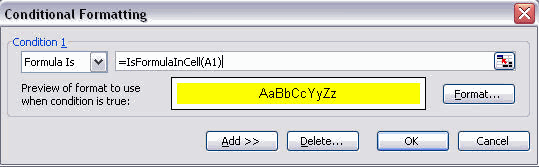
To format cells containing Formulas using the Conditional Formatting dialog box, add a VBA Function:
Step 1: Add the following VBA Function to a regular Module:
Function IsFormulaInCell (Cell) As Boolean
IsFormulaInCell= Cell.HasFormula
End Function
Step 2: Use the Custom Function to identify and format cells containing formulas:
1. Select the cells in the sheet by pressing Ctrl+A, in Excel 2003 press Ctrl+A+A from a cell inside a region.
2. From the Format menu, select Conditional Formatting.
3. In Condition 1, select Formula is from the dropdown list.
4. In the formula box, type =IsFormulaInCell(A1), and then click Format.
5. From the Font tab, select any desired color and click OK twice.
Screenshot // Formatting Cells Containing Formulas